Blog posts tagged with 'nopcommerce'

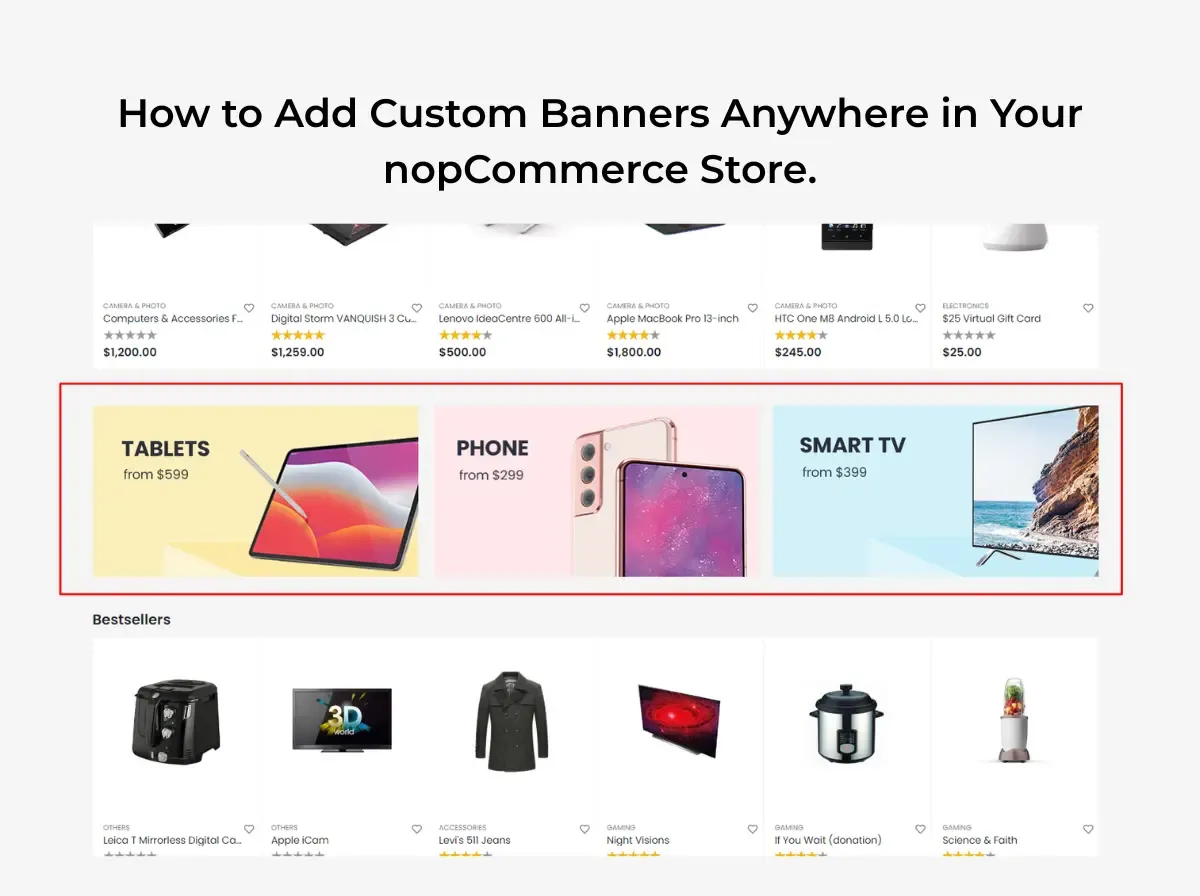
How to Add Custom Banners Anywhere in Your nopCommerce Store

Banners are one of the simplest tools a store owner has for communicating with shoppers. A well-placed banner can announce a seasonal offer, introduce a new product line, promote a specific category, or simply remind visitors that orders over a certain amount ship free. Retailers use banners for limited-time offers, brand campaigns, and trust messaging  things like return policies or delivery timelines  because a banner sits in the shopper's field of view without requiring them to read a full page of copy.

The trouble most nopCommerce store owners run into isn't whether to use banners. It's how to place them. In a typical nopCommerce setup, adding a banner to a new spot on the site, a footer zone, a category page, a specific widget zone, often means asking a developer to touch the theme templates. That's fine for a one-time change. It becomes a bottleneck when a marketing team wants to run five campaigns a month across different sections of the store.

This is where a nopCommerce banner plugin becomes relevant. Instead of hardcoding banner markup into .cshtml files every time a campaign changes, a banner plugin gives store administrators a way to manage banner content from the admin panel and place it in supported areas of the store. Shivaay Soft - own contribution to this space is the nopCommerce Anywhere Banner Plugin, a plugin included across several of its nopCommerce theme packages. This article walks through where banners are commonly used in a nopCommerce store, how to approach adding them, and where a banner plugin fits into that workflow. It won't claim that banners automatically drive more sales that depend entirely on relevance, design, and where a banner sends the visitor. What it will do is lay out a practical, technically grounded approach to banner placement in nopCommerce.

Why Custom Banners Matter for a nopCommerce Store

Banners serve more than one purpose, and it helps to be specific about which job a given banner is doing before deciding where to put it.

  • Promotions a discount, bundle offer, or flash sale.

  • Merchandising drawing attention to a specific product line or collection without redesigning the homepage.

  • Product discovery surfacing items a shopper might not find through normal browsing or search.

  • Category navigation helps shoppers understand what a category contains or how it's organized.

  • Seasonal campaigns aligning the storefront with a holiday, event, or time-limited push.

  • Brand communication reinforcing tone, values, or a brand story.

  • Customer education explaining shipping policies, return windows, or how a loyalty program works.

It's worth distinguishing between banner types, because they behave differently:

  • Decorative banners exist mainly to make a page feel finished. They carry little or no call to action.

  • Promotional banners exist to drive a specific action tied to a specific offer.

  • Informational banners communicate policy or service details, shipping thresholds, return windows, security badges.

  • Navigation banners help shoppers move toward a category, collection, or curated set of products.

  • Campaign banners are time-bound and tied to a specific event, launch, or seasonal push.

The common thread across all five is that banner placement should support the shopping journey, not interrupt it. A banner that competes with the product grid for attention, or sends a shopper somewhere unrelated to what it promised, works against the store rather than for it.

What Is a nopCommerce Banner Plugin?

A banner plugin, in general terms, is an admin-manageable tool for creating and placing banner content across a storefront without editing the underlying theme code for every change. Typical functionality found in this category of plugin includes:

  • Creating banner records (image, and often a linked destination).

  • Managing that content from the admin panel rather than a code editor.

  • Selecting where a banner appears, depending on what the plugin supports.

  • Linking a banner to a relevant internal or external page.

  • Where supported, scheduling a campaign to start and end automatically.

  • Where supported, managing separate visuals for desktop and mobile.

  • Updating or swapping a campaign without a developer editing theme templates.

It's important to be clear that not every banner plugin supports every item on that list. Scheduling, device-specific visuals, analytics, and drag-and-drop placement are advanced features that some banner tools offer and others don't. The general description above is what the category of plugin typically aims to do; it isn't a feature list for any one specific product, including Shivaay Soft.


What Is the nopCommerce Anywhere Banner Plugin?

The Nop Anywhere Banner plugin is developed by Shivaay Soft and is included as part of several of the company's nopCommerce theme packages, including themes such as Loom, ShopJunction, Store Box, Cosmetic, Liquor, SuperMarket, and Jewellery. According to Shivaay Soft, it functions as a widget for placing promotional banners in configurable zones across the storefront, and banner placement can be adjusted without touching the store's core theme logic.

The underlying problem it addresses is a familiar one for anyone who has run a nopCommerce store for more than a few months: a marketing team wants to introduce a banner in a new area of the site, and doing that safely usually means a developer opening theme files, adding markup, and redeploying. Multiply that across a handful of campaigns a month, on a handful of theme sections, and it turns into a steady stream of small development tickets.

An "anywhere" banner concept is useful precisely because it decouples banner placement from template editing. Rather than a banner being hand-coded into one specific spot, the plugin exposes configurable zones where a banner can be placed and swapped through the admin panel. That's a meaningfully different workflow from asking a developer to insert an <img> tag into a Razor view every time a campaign changes.

To be precise about scope: this article is not claiming the plugin can place a banner in literally every conceivable location in a nopCommerce store. Its exact list of supported zones, and which specific nopCommerce versions each theme bundle supports, should be confirmed directly with Shivaay Soft or through the plugin's own documentation before it's used to plan a specific campaign calendar.


Where Can You Use Custom Banners in nopCommerce?

Homepage

The homepage is the most common banner location because it's the first thing most visitors see. Typical uses include a seasonal campaign hero, a new collection announcement, a sitewide promotional offer, or a simple free-shipping message near the top of the page.

Category Pages

Category pages benefit from banners that are specific to what's actually in that category: a category-specific promotion, a collection campaign tied to that category's products, a short buying guide, or a seasonal push relevant to that category (winter coats in a clothing category, for example).

Product Pages

Product pages can carry a related promotion, shipping information specific to that product type, a campaign tied to that individual product, or a cross-sell message pointing toward complementary items. These banners work best when they're short; a product page's primary job is still to sell the product in front of the visitor.

Shopping and Cart Areas

Cart and checkout-adjacent areas are a natural place to communicate shipping thresholds ("Free shipping over $75"), active promotional codes, or other purchasing information the shopper needs before completing an order. Whether a specific plugin supports placement in these exact areas depends on that plugin's supported zones, so this should be verified against the plugin's own documentation rather than assumed.

Content and Informational Pages

Blog posts, brand story pages, and other content pages can use banners to promote related blog content, highlight a brand campaign, share a store announcement, or point toward educational material like a sizing guide or care instructions.


How to Add a Custom Banner in nopCommerce

Step 1: Create the banner design. Start with correct dimensions for the intended zone, a message that can be read in a few seconds, clear visual hierarchy (headline, supporting text, CTA), readable typography at the banner's actual display size, and a CTA that matches the offer.

Step 2: Prepare the destination URL. Decide exactly where the banner should send visitors - a specific product page, a category page, a curated collection, or a dedicated promotional landing page. This should be settled before the banner goes live, not after.

Step 3: Upload or configure the banner. In a plugin-managed workflow, this generally means uploading the banner image and entering its destination through the admin panel rather than editing template files directly. The exact screens and labels will depend on the specific plugin in use.

Step 4: Select the required placement. Which zones are available depends entirely on what the plugin supports. Some zones are widget-based and configurable through the admin; others may require developer involvement if they fall outside the plugin's supported areas.

Step 5: Configure the campaign. If the plugin supports scheduling or visibility rules, this is where they'd be set. If it doesn't, campaigns will need to be manually activated and deactivated on the intended dates.

Step 6: Preview and test. Check the banner on desktop, mobile, and tablet breakpoints, in more than one browser, and confirm the link destination, image quality, and that the surrounding page layout hasn't shifted or broken.

Step 7: Publish and monitor. Once live, keep an eye on the banner for the duration of the campaign; broken links and expired offers left running are more common than they should be.


Best Practices for Designing nopCommerce Banners

Keep the Message Clear

A visitor should understand the offer within a second or two of seeing the banner. If it takes longer than that, the message is too dense for a banner format.

Use One Primary CTA

Pick one action Shop Now, Explore Collection, View Products, Learn More and build the banner around it. Multiple competing CTAs dilute the whole thing.

Match the Banner to the Destination

If the banner promises 20% Off Summer Collection, it should send the visitor to that collection, not the general homepage. Mismatched banners create friction and erode trust quickly.

Optimize Banner Images

Compress images before upload, use dimensions appropriate to the zone rather than oversized originals, use modern formats where the store's setup supports them, serve responsive images where possible, and avoid unnecessarily large file sizes that slow down page load.

Design for Mobile

A banner that looks sharp on a 1920px desktop screen can be unreadable or awkwardly cropped on a phone. Mobile layouts need their own design pass, not an assumption that the desktop version will scale down cleanly.

Avoid Banner Overload

Stacking multiple promotional banners on the same page competes for attention and can make a store feel cluttered rather than helpful. A page with one clear banner usually outperforms one with three fighting for the same eyeballs.


How Banner Placement Can Improve the Shopping Experience

Good banner placement follows a simple chain: banner → message → relevant page → customer action. Each link in that chain needs to hold up.

For example, a banner reading "20% Off Summer Collection" should lead directly to the Summer Collection category page - not the store's homepage, and not an unrelated category. Sending a visitor to a generic landing page after a specific promise forces them to search for what was advertised, and some will simply leave instead.

Relevance matters more than volume. One well-targeted banner that sends shoppers to exactly what it promised will generally serve the shopping experience better than several loosely related banners scattered across a page.


Manual Banner Development vs. nopCommerce Banner Plugin

Factor

Manual Theme Development

Banner Plugin

Development Effort

Higher each new placement or layout change typically needs a developer

Lower for standard placements within the plugin's supported zones

Flexibility

Very high any custom layout or logic is possible

Bound by the plugin's supported zones and configuration options

Marketing Team Control

Limited usually requires a dev request

Higher for changes within supported zones

Theme Code Changes

Required for most changes

Reduced for placements the plugin already supports

Campaign Management

Manual, often ad hoc

More centralized, depending on plugin capabilities

Maintenance

Can accumulate technical debt if banners are hardcoded across many templates

Centralized banner records are generally easier to maintain

Developer Dependency

High

Lower for supported placements, still needed for anything outside plugin scope

Long-Term Management

Can become harder to track as more one-off banners are added over time

Easier to audit and update from a single admin area

Neither approach is universally better. Manual development still makes sense for highly customized placement logic, complex conditional display rules, or layouts that fall outside what any general-purpose banner plugin supports. A banner plugin tends to be the more practical choice when a store team needs reusable banner management and doesn't want every placement change to become a development ticket.


Benefits of Using the nopCommerce Anywhere Banner Plugin

Based on Shivaay Soft own description of the plugin, and consistent with what an anywhere banner concept is designed to solve, the plugin is positioned around a few specific advantages:

  • Reduced dependence on theme code changes banner placement can be adjusted without touching the store's core theme logic, according to Shivaay Soft.

  • Configurable placement zones the plugin is described as a widget for placing promotional banners in configurable zones across the storefront.

  • Consistency across theme packages the plugin ships as part of multiple Shivaay Soft theme bundles, which means stores built on those themes get a consistent banner-management approach out of the box.

Beyond these specific, verifiable points, the broader benefits of adopting any appropriately matched banner-management approach faster campaign turnaround, less developer back-and-forth, more centralized oversight of active banners are general advantages of moving away from hardcoded banners, not claims specific to this plugin's feature set. Anyone evaluating the plugin for a specific use case should confirm its exact supported zones and configuration options directly with Shivaay Soft.


Common Banner Management Mistakes to Avoid

  • Oversized images  slow page loads and hurt Core Web Vitals.

  • Too many text banners aren't the place for paragraphs; save detail for the landing page.

  • Weak CTA vague or missing calls to action reduce clarity about what to do next.

  • Poor mobile design, a banner that only works on desktop fails a large share of visitors.

  • Sending users to irrelevant pages breaks the promise made by the banner's message.

  • Too many banners competing messages dilute attention rather than adding value.

  • Forgetting expired campaigns and a live banner for a sale that ended two weeks ago damages trust.

  • Not testing links broken destination URLs is an easy, avoidable mistake.

  • Ignoring page speed, unoptimized banner images are a common, overlooked source of slow page loads.

  • Depending on hard-coded theme changes for every campaign turns routine marketing updates into recurring development work.


How to Use Banners for Seasonal eCommerce Campaigns

Seasonal campaigns are one of the most common reasons stores add or swap banners. A few examples of where banner messaging needs to line up with the actual campaign and landing page:

  • Black Friday :- a clear discount message linking straight to the discounted collection, not the general homepage.

  • Christmas :- gift-guide or holiday-collection banners linking to curated gift categories.

  • New Year :- clearance or "new arrivals" messaging depending on the store's actual New Year strategy.

  • Valentine's Day :- banners tied to relevant gift categories rather than the whole catalog.

  • Summer Sale :- seasonal category banners linking to summer-specific collections.

  • Back-to-School :- banners aligned with relevant product categories (stationery, electronics, apparel, depending on the store).

  • Product Launches :- a dedicated banner pointing to the new product or collection page.

  • Clearance Sales :- banners linking directly to the clearance category, not a general sale page that requires further filtering.

None of this requires inventing performance numbers to justify it the logic is simply that a banner's message and its destination should match the actual campaign being run.


Banner SEO and Performance Considerations

Banners sit on pages that still need to perform well in search and load quickly for visitors. A few technical points worth keeping in mind:

  • Image ALT text - every banner image should have descriptive ALT text, both for accessibility and because banners often carry meaningful visual information.

  • Image compression - banners are frequently among the largest images on a page; compress them properly before upload.

  • Page speed - an unoptimized banner can meaningfully affect Largest Contentful Paint, especially when it appears above the fold.

  • Lazy loading where appropriate - banners further down the page can be lazy-loaded; a hero banner above the fold generally should not be, to avoid delaying its render.

  • Responsive design - banners should adapt to different screen sizes rather than relying on a single fixed-size image.

  • Accessible text - where possible, keep key messaging as real text rather than only baked into the image, which also helps with any assistive technology reading the page.

  • Avoiding text embedded entirely inside images - this limits accessibility and means the message can't be indexed as text.

  • Descriptive links - the destination link behind a banner should point somewhere genuinely relevant to its message.

  • Relevant landing pages - the page a banner sends visitors to should be optimized in its own right; a banner cannot compensate for a weak or thin landing page.

Banners support a page's presentation, but they aren't a substitute for solid page content and technical SEO underneath them.


How to Test a New Banner Before Publishing

Before a new banner goes live, run through a short checklist:

  • ✓ Correct image

  • ✓ Correct placement

  • ✓ Correct destination URL

  • ✓ Mobile display

  • ✓ Desktop display

  • ✓ CTA visibility

  • ✓ Image loading correctly

  • ✓ No layout shift where avoidable

  • ✓ Accessibility (ALT text, contrast, readable type)

  • ✓ Campaign dates, if scheduling is supported

  • ✓ No overlap with navigation or product content

A few minutes spent on this checklist catches most of the common mistakes listed earlier before they reach live traffic.


When Should You Use a nopCommerce Banner Plugin?

A banner plugin tends to make sense when a store:

  • Runs frequent promotional campaigns.

  • Needs banners across multiple sections of the store, not just the homepage.

  • Has a marketing team that needs to update content faster than a development queue allows.

  • Regularly requires multiple banners live at once.

  • I want more flexible, self-service banner management.

  • Has developers who are repeatedly asked to change banner placements as a routine task.

Custom development may still be the better fit when a store needs:

  • Highly specialized placement logic that doesn't map to a plugin's supported zones.

  • Complex personalization (banners that change based on customer segment, browsing history, or other conditional logic).

  • Advanced targeting requirements beyond what a general banner plugin offers.

  • Custom business workflows tied to banner display.

  • Integrations that go beyond what the plugin's functionality covers.

The right choice depends on matching the store's actual requirements to what a given plugin documents, rather than assuming either approach is automatically correct.


Why Choose Shivaay Soft for nopCommerce Customization?

Shivaay Soft is a nopCommerce development and customization company with experience across nopCommerce Development, Custom nopCommerce Development, nopCommerce Plugin Development, nopCommerce Theme Development, nopCommerce Upgrade, eCommerce Customization, API Integration, Performance Optimization, and Technical Support.

For stores evaluating banner-management options, the Nop Anywhere Banner Plugin is a relevant option when its documented functionality of configurable banner zones and reduced dependence on theme code changes matches what the store actually needs. It's included as part of several Shivaay Soft theme packages, so stores already running on one of those themes have it available without a separate installation.

For requirements that fall outside a bundled plugin's scope, Shivaay Soft plugin development and custom nopCommerce development services can address more specific placement logic, custom widget zones, or banner behavior tied to other parts of the store.


Conclusion

Custom banners are a practical tool for merchandising, promotions, and communicating store information but only when placement is intentional. A banner's value comes from matching its message to a relevant landing page, working properly on mobile, and loading quickly, not from simply adding more of them to a page.

For nopCommerce stores that run frequent campaigns across multiple sections of the site, a nopCommerce banner plugin can reduce the repetitive development work that comes with hardcoding banners into theme templates. Shivaay Soft nopCommerce Anywhere Banner Plugin is one option worth evaluating for stores already using a Shivaay Soft theme, provided its supported zones match what the store needs. As with any plugin decision, it's worth reviewing the store's actual banner-management requirements: how often campaigns change, how many sections need banners, and how much control the marketing team needs  before choosing between manual development and a plugin-based approach.

If you're weighing banner placement options for your nopCommerce store, or need a placement that goes beyond what a bundled plugin supports, Shivaay Soft development team can help assess the right approach for your setup.


Frequently Asked Questions

It's an admin-manageable tool that lets store owners create and place banner images across a nopCommerce storefront without editing theme template code for every change.

It's a plugin developed by Shivaay Soft, included in several of its nopCommerce theme packages, described by Shivaay Soft as a widget for placing promotional banners in configurable zones across the storefront without requiring core theme code changes.

Common areas include the homepage, category pages, product pages, cart or checkout-adjacent zones, and content pages such as blog or brand pages—though exact supported zones depend on the theme and any plugin in use.

Yes, category-page banners are a common use case for promoting category-specific offers, collections, or seasonal campaigns relevant to that category.

Product-page banners are commonly used for cross-sell messages, shipping information, or product-specific promotions, provided the theme or plugin supports that placement.

When a banner's message matches a relevant landing page, it helps shoppers find what they're looking for faster. Mismatched or overloaded banners tend to hurt the experience rather than help it.

Yes. A banner designed only for desktop can display poorly, get cropped awkwardly, or become unreadable on smaller screens, so mobile layouts need their own design consideration.

Compress images before upload, use dimensions appropriate to the display zone, use modern image formats where supported, and consider lazy loading for banners that appear below the fold.

It depends on the store's requirements. A plugin is often more efficient for standard, repeatable banner placements, while custom development suits highly specific placement logic or advanced personalization that a general plugin doesn't support.

Start with the goal of the banner - promotion, information, or navigation—match its message to a genuinely relevant landing page, and confirm the placement is supported by your theme or plugin before building the campaign around it.
Wednesday, September 16, 2026

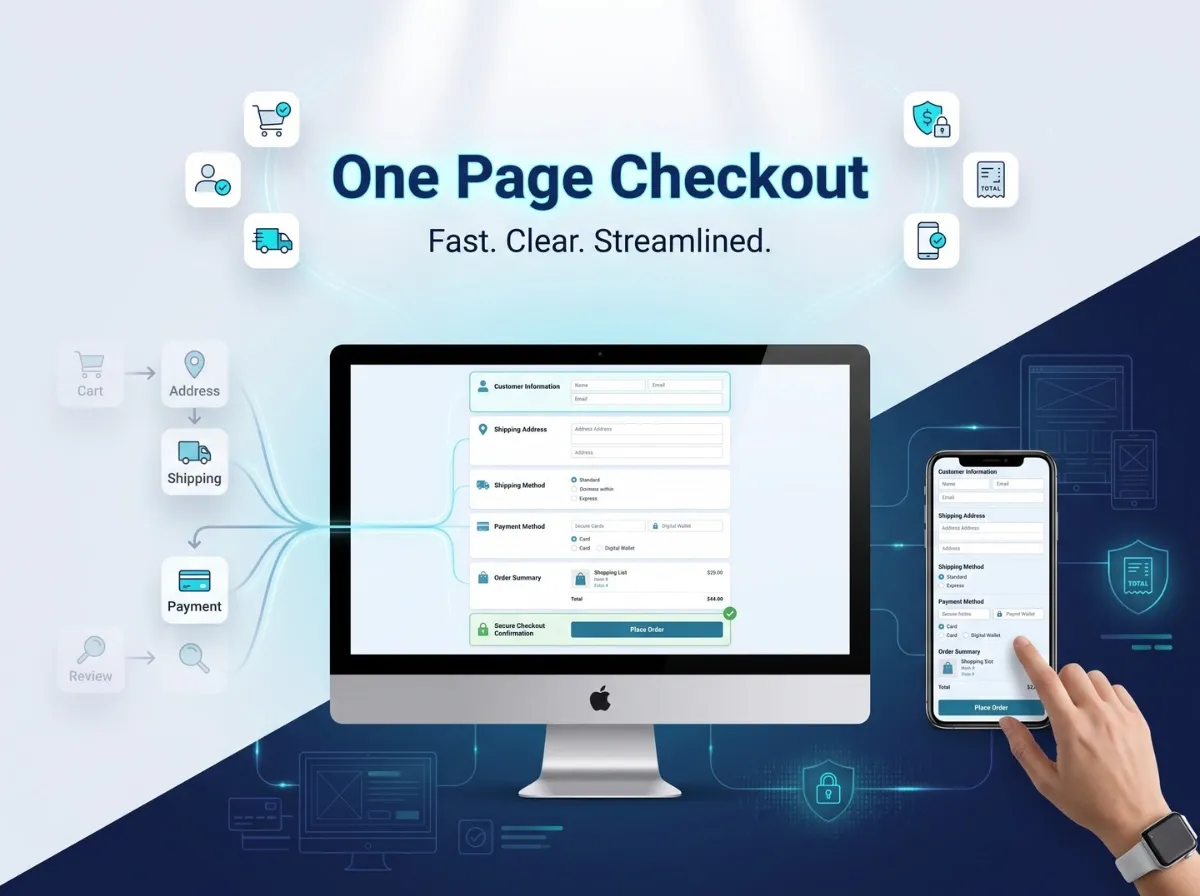
How to Improve the nopCommerce Checkout Experience with One Page Checkout

Checkout is the moment where interest turns into revenue. A customer has already chosen a product, added it to the cart, and decided to pay. The only thing left is to get out of their own way and let them finish. Yet checkout is also where many stores unintentionally introduce friction: extra clicks, repeated fields, unclear shipping options, or a payment step that feels disconnected from the rest of the order.

Customers generally expect checkout to be predictable and quick. They want to see what they're buying, know what it costs, choose how it ships, pay, and get confirmation without having to guess what happens next. When a checkout process adds unnecessary steps or forces customers to navigate between disconnected screens just to complete a straightforward order, that complexity becomes friction, even if every step is technically necessary.

One Page Checkout is one approach nopCommerce store owners can consider when looking to simplify this journey. Rather than moving customers through several separate pages, a one-page approach consolidates the key checkout steps into a single, structured view. This article looks at what that means in practice, how it compares to a traditional multi-step nopCommerce checkout, and what to evaluate including Shivaay Soft's Instant One Page Checkout plugin before making a change to your live checkout flow.

Why the Checkout Experience Matters for nopCommerce Stores

Checkout is where design decisions have the most direct business impact. A product page can be mediocre and still convert if the offer is strong; a confusing checkout can stall an otherwise motivated buyer at the last step.

A few areas deserve particular attention on any nopCommerce store:

  • Purchase flow clarity customers should always know which step they're on and what comes next.

  • From complexity every additional field is something a customer has to stop and think about, especially on mobile.

  • Shipping selection, unclear delivery options or late-appearing shipping costs create hesitation.

  • Payment selection the available payment methods and how they're presented affect completion.

  • Order review customers want to double-check quantities, pricing, and totals before committing.

  • Mobile usability: a large share of nopCommerce traffic now completes checkout on a phone, where layout and input friction matter more.

  • Trust and transparency, clear totals, policies, and confirmation messaging reduce hesitation at the final step.

The goal of checkout optimization isn't to strip the process down to the bare minimum. It's to remove friction that doesn't serve a purpose while keeping the information, validation, and business logic the store actually needs.

What Is One Page Checkout?

One Page Checkout describes a checkout experience that consolidates the core purchase steps of customer information, billing, shipping, shipping method, payment method, order summary, and confirmation into a more streamlined page or flow, rather than spreading them across several separate screens with full page reloads in between.

In a typical multi-step layout, a customer might move through distinct pages for billing address, shipping address, shipping method, payment method, and a final confirmation page before the order is placed. A one-page approach groups these into organized sections on a single screen (or a single scrollable/tabbed flow), so the customer can see more of the process at once.

The exact implementation of One Page Checkout varies depending on the platform, theme, and plugin configuration. Some approaches use collapsible sections, others use a single scrollable form, and the level of customization available depends on the specific plugin and how it integrates with the store's existing checkout logic.


What Is Instant One Page Checkout for nopCommerce?

Instant One Page Checkout is a checkout plugin built by Shivaay Soft for the nopCommerce platform. According to Shivaay Soft's official product page, the plugin is designed to make the checkout process simpler, more flexible, and more user-friendly, with the aim of saving customers time when completing a purchase.

Based on the verified product documentation, Instant One Page Checkout includes the following features:

  • Reduces the standard six-step nopCommerce checkout to a single page.

  • Customers can remove items or edit quantities directly on the checkout page, without returning to the cart.

  • Quick selection of shipping and billing addresses from the same view.

  • Support for displaying checkout attributes on the one-page layout, such as gift wrapping options.

  • The ability to enter coupon codes and gift card codes directly during checkout.

  • Support for both guest checkout and registered customer checkout.

  • A mobile-friendly, fully responsive layout.

On the specification side, the plugin is listed as supporting nopCommerce versions 4.70, 4.80, and 4.90, includes RTL (right-to-left) language support, is built with a clean HTML and CSS structure intended to make customization easier, is fully localizable, has been tested across major browsers, and comes with one year of free support and upgrades from the purchase date.

In the context of checkout optimization, Instant One Page Checkout is positioned as a way to reduce the number of distinct steps and page transitions a nopCommerce customer has to go through, while keeping core checkout functionality addresses, shipping, payment, discounts available on one screen.

Traditional Multi-Step Checkout vs One Page Checkout

Aspect

Traditional Multi-Step Checkout

One Page Checkout

Checkout Navigation

Sequential pages, one step at a time

Consolidated into a single page or flow

Number of Visible Steps

Typically several distinct pages

Reduced to one primary page

Customer Information

Entered on a dedicated step

Entered within a section of the same page

Shipping Selection

Separate page/step

Selected within the same page

Payment Selection

Separate page/step

Selected within the same page

Order Summary

Often shown only at the end

Can remain visible throughout

Page Transitions

Multiple full page loads

Fewer transitions between steps

Mobile Experience

Depends on theme and step design

Depends on plugin's responsive implementation

Customization Requirements

Standard nopCommerce checkout logic

May require additional configuration and testing

Business Suitability

Suited to complex, multi-stage workflows

Suited to more linear purchase journeys

There is no universal answer to which model is better. The right checkout structure depends on product type, typical customer behavior, shipping requirements, available payment methods, store design, the proportion of mobile traffic, and internal business workflows. A store selling configurable B2B products with multiple approval steps has different needs than a direct-to-consumer store selling a handful of SKUs.

How One Page Checkout Can Improve the Customer Experience

1. Reduces Unnecessary Navigation

Consolidating checkout steps can reduce the amount of clicking and page-loading a customer has to do to complete an order. Fewer transitions mean fewer moments where a customer has to reorient themselves on a new page. This is about clarity and flow, not a guaranteed increase in completed orders - results still depend on the store's traffic and offer.

2. Gives Customers a Better View of Their Order

An order summary that stays visible throughout checkout helps customers keep track of products, quantities, unit pricing, shipping charges, and the running total. When customers can see this information without switching screens, they're less likely to second-guess what they're paying for.

3. Creates a More Continuous Checkout Flow

Rather than treating billing, shipping, and payment as isolated steps, a one-page structure presents them as parts of one connected process. Customers can move between sections without losing context, which can make the overall experience feel more coherent.

4. Can Improve Mobile Checkout Usability

Mobile checkout has its own constraints: limited screen space, on-screen keyboards, and the need for clearly separated form sections. A well-built one-page checkout can group information into clear, collapsible or scrollable sections, use touch-friendly controls for shipping and payment selection, and keep the order summary accessible. It's worth noting that not every one-page checkout implementation is automatically mobile-optimized; that depends on how the specific plugin and theme handle responsive layout.

5. Helps Identify Checkout Friction

Reviewing your existing checkout whether or not you change its structure is a useful exercise on its own. It often surfaces repeated form fields, steps that don't add value, confusing navigation between pages, shipping costs that appear late in the process, or a payment selection step that's harder to use than it needs to be.

Key Elements of an Effective One Page Checkout

Regardless of which plugin or approach a store uses, a few elements consistently matter:

  • Clearly separated sections for customer information, address, shipping, payment, and order summary

  • Accurate, real-time order totals that update as options change

  • Visible shipping method options with associated costs

  • Available payment methods presented clearly

  • Inline validation and error messages that tell customers exactly what to fix

  • Mobile-appropriate input types and spacing

  • Transparent pricing with no costs that appear unexpectedly at the final step

  • Trust indicators where appropriate, such as secure payment badges or clear policy links

Simplifying the interface should never mean removing information customers need to make a confident decision. The goal is to organize that information better, not hide it.

How Instant One Page Checkout Fits into a nopCommerce Store

Introducing any checkout plugin into an existing nopCommerce store is a technical change, not just a visual one. Before deployment, it's worth thinking through:

  • Store theme compatibility how the plugin's markup and styling interact with your current theme

  • Existing checkout workflows any custom logic already built into your checkout

  • Payment methods  which gateways your store uses and how they render within the new layout

  • Shipping methods how shipping rules and rates are calculated and displayed

  • Guest checkout configuration whether guest checkout is enabled and how it should behave

  • Customer accounts how returning customer data (saved addresses, order history) is handled

  • Custom plugins whether other checkout-related extensions are installed

  • Store-specific customization any bespoke fields or business rules already in place

Shivaay Soft's documentation specifies supported nopCommerce versions (4.70, 4.80, 4.90) and notes that the plugin uses a clean HTML/CSS structure intended for easier customization. It does not claim compatibility with every theme, every payment gateway, or every custom workflow and it shouldn't be assumed to. As with any checkout-level change, testing in a staging environment before production deployment is the responsible approach.

Step-by-Step Checklist Before Implementing One Page Checkout

1. Review Your Current Checkout Journey Look at the number of steps, where customers seem to drop off, how checkout performs on mobile, how many form fields are required, and which shipping and payment methods are offered.

2. Review Store Customizations Identify any custom checkout code, existing checkout-related plugins, theme-level modifications, and current payment or shipping integrations that a new plugin will need to coexist with.

3. Review Plugin Compatibility Confirm your nopCommerce version against the plugin's supported versions, check the plugin version itself, and consider theme compatibility and existing customizations. Only rely on compatibility details confirmed in the official product documentation.

4. Test on Staging Before touching your live store, test guest checkout, registered customer checkout, address selection, shipping calculation, payment processing, discount and gift card codes, order totals, and the experience across multiple mobile devices.

5. Monitor After Launch Once live, keep an eye on checkout errors, customer feedback, payment failures, shipping calculation issues, and overall order completion behavior for at least the first few weeks.

One Page Checkout and Mobile Commerce

Mobile checkout carries its own set of constraints that deserve dedicated attention: smaller screens limit how much information can be shown at once, on-screen keyboards can obscure form fields, address entry is more error-prone on a touchscreen, and page speed has a more noticeable impact on smaller connections.

Practical considerations for mobile checkout include:

  • Large, touch-friendly buttons and form controls

  • Clear, legible form labels

  • Only the fields that are actually required

  • Validation errors that are visible without scrolling

  • An order summary that's easy to review without excessive scrolling

  • A genuinely responsive layout, not just a scaled-down desktop design

Payment and Shipping Considerations

Checkout improvements only matter if they work correctly with how the business actually operates.

Payment:

  • Which payment methods are available and how they're displayed

  • How the plugin integrates with your existing payment gateway(s)

  • How payment errors are communicated to the customer

  • How payment confirmation is handled

  • Ensuring payment processing remains secure throughout the flow

Shipping:

  • Which shipping methods are offered and how rates are calculated

  • How delivery information is presented to the customer

  • How shipping costs are displayed relative to the rest of the order

  • Address validation

  • How the checkout handles multiple shipping scenarios, such as different delivery options or split shipments

Compatibility with a specific gateway or shipping provider should always be confirmed against the plugin's documentation rather than assumed.

Common One Page Checkout Mistakes to Avoid

Too Many Form Fields :- Consolidating steps onto one page doesn't mean every field from every step should stay. Review whether each field is actually necessary.

Overloading the Page with Information :- A single page can still feel cluttered if sections aren't visually separated.

Poor Mobile Design :- A one-page layout that isn't properly responsive can be harder to use on mobile than a well-designed multi-step flow.

Unclear Validation Errors :- Customers need to know exactly what went wrong and where, especially when everything is on one screen.

Hidden Costs :- Shipping fees or taxes that appear only at the final total undermine trust, regardless of checkout structure.

Poor Order Summary Visibility :- If customers can't easily see what they're paying for, consolidation doesn't help.

Ignoring Payment Errors :- Failed payments need clear, actionable messaging, not a generic error.

Ignoring Shipping Scenarios :- Edge cases like split shipments or unavailable delivery options need to be handled gracefully.

Skipping Plugin Testing :- Deploying a checkout change directly to production without staging tests risks disrupting live orders.

Not Monitoring Checkout Performance :- Launching a new checkout isn't the end of the process; ongoing monitoring catches issues real customers encounter.

How to Measure Checkout Experience Improvements

Rather than assuming a checkout change has improved things, measure it using your own store's analytics. Useful metrics include:

  • Checkout starts vs. checkout completions

  • Payment failure rates

  • Form validation error frequency

  • Mobile vs. desktop checkout performance

  • Direct customer feedback

  • The full cart-to-order journey, not just the final step

It's worth being clear that no checkout structure guarantees a specific improvement in conversion rate. Results depend on traffic quality, pricing, available payment options, overall UX, shipping costs, and other store-specific factors. Checkout structure is one variable among many.

Instant One Page Checkout vs Custom Checkout Development

Aspect

Instant One Page Checkout (Plugin)

Custom Checkout Development

Implementation Time

Generally faster to deploy

Longer, based on scope

Customization

Available within the plugin's structure

Built entirely around specific requirements

Business-Specific Workflow

Suited to standard checkout workflows

Suited to specialized or complex workflows

Maintenance

Handled through plugin updates

Requires ongoing in-house or vendor maintenance

Integration Requirements

Works within existing store setup, tested per documentation

Built to integrate with any required system

Cost Considerations

Lower upfront cost

Higher upfront investment

Plugin Updates

Includes update support per license terms

No vendor update cycle; managed internally

Long-Term Flexibility

Bound by plugin architecture

Fully flexible, built to spec

A ready-made plugin like Instant One Page Checkout can be a good fit for stores whose checkout requirements align with its available functionality. Custom development becomes more relevant when a store has specialized workflows, complex pricing logic, or integrations that a general-purpose plugin isn't built to handle. Neither approach is inherently superior the right choice depends on what the store actually needs.

When Should a nopCommerce Store Consider One Page Checkout?

One Page Checkout is worth evaluating when:

  • The current checkout journey feels unnecessarily long or complex

  • Mobile checkout usability needs improvement

  • Customers need a clearer, more visible purchase flow

  • The store wants to reduce navigation between checkout steps

  • Existing business requirements are compatible with a streamlined, single-page structure

Additional analysis is usually warranted when a store has complex B2B purchasing workflows, multiple fulfillment processes, highly customized checkout logic, complex pricing or discount rules, or specialized third-party integrations that need to be preserved.

Why Choose Shivaay Soft for nopCommerce Checkout Customization?

Shivaay Soft works across the nopCommerce ecosystem, including nopCommerce development, custom development for stores with specific requirements, nopCommerce plugin development, checkout customization, payment gateway integration, shipping integration, API integration, nopCommerce theme development, nopCommerce version upgrades, and ongoing technical support.

For stores whose checkout needs align with its documented functionality, Instant One Page Checkout offers a structured way to consolidate the checkout process without building a solution from scratch. For stores with more specific or complex requirements, Shivaay Soft's development team can also scope custom checkout work directly.

Conclusion

Checkout experience is one of the most consequential parts of eCommerce usability it's the last interaction before a customer makes an order. Before making changes, it's worth identifying where real friction exists in your current flow, rather than assuming any particular checkout structure is the fix.

One Page Checkout can help create a more connected, easier-to-follow purchase flow by consolidating steps that would otherwise be spread across multiple pages. Whether that structure is right for your store depends on your mobile traffic, payment and shipping setup, existing customizations, and how your customers actually shop.

For nopCommerce stores whose requirements fit its documented functionality, Instant One Page Checkout is one option worth evaluating and thorough staging testing should come before any live rollout, regardless of which solution you choose.

Frequently Asked Questions

It's a checkout approach that consolidates the standard multi-step checkout process customer information, shipping, payment, and order review into a single page or flow, rather than spreading them across separate pages.

Instant One Page Checkout is a plugin by Shivaay Soft that reduces the standard six-step nopCommerce checkout to a single page, with features including quick address selection, editable cart items on the checkout page, coupon and gift card entry, and support for both guest and registered checkout.

It can reduce navigation between pages, keep the order summary visible throughout the process, and create a more continuous flow though actual impact varies by store and audience.

Instant One Page Checkout is documented as mobile-friendly and fully responsive. As with any checkout plugin, mobile usability should still be tested on real devices before launch.

Payment method support depends on how the plugin integrates with your store's existing payment gateways. Confirm compatibility with specific gateways against the plugin's documentation.

Shipping method support depends on your store's existing shipping configuration and how the plugin displays and calculates shipping options. This should be verified during staging tests.

Yes. Any checkout-level change should be tested in a staging environment first, covering guest and registered checkout, addresses, shipping, payments, discounts, and mobile devices.

Yes. Depending on the store's requirements, customization can range from configuring a plugin like Instant One Page Checkout to fully custom checkout development.

Track checkout starts versus completions, payment failure rates, form errors, mobile versus desktop performance, and customer feedback using your store's own analytics.

Not necessarily. It tends to suit stores with more linear purchase journeys. Stores with complex B2B workflows, multiple fulfillment processes, or highly customized checkout logic may need additional evaluation or custom development.
Monday, September 14, 2026

Advance Store Box Theme: One of the Best Feature-Rich nopCommerce Themes in 2026

A storefront is usually the first real interaction a customer has with a business. Before they read a product description or check a price, they form an impression from layout, navigation, and how easily they can find what they came for. For a nopCommerce store, that impression is shaped largely by the theme running underneath it.

Choosing the right nopCommerce theme is not just a design decision. It affects how customers browse categories, how quickly they locate products, and how comfortable they feel completing a purchase. Businesses evaluating nopCommerce themes 2026 are typically looking for something that already covers common storefront needs, so they are not rebuilding the same layout components - menus, product grids, cart pages  from zero.

This is where the Advance Store Box Theme by Shivaay Soft fits in. It is positioned as a feature-rich storefront theme for nopCommerce, built to give store owners a working, professional-looking foundation without starting from a blank canvas. This article looks at what the theme actually offers, based on its official listing and product page, and where it may or may not be the right fit for a given store. No claims here are guarantees of sales growth or conversion improvement a theme is one part of a much larger storefront equation.


What Is the Advance Store Box Theme?

The Advance Store Box Theme is a premium storefront theme built for the nopCommerce platform, developed by Shivaay Soft, a nopCommerce solution partner. According to its official marketplace listing, the theme is described as a premium online ecommerce store theme with a responsive design intended to let customers shop comfortably across devices.

Within a nopCommerce store, a theme controls the visual and structural layer, how the homepage is organized, how category and product pages are laid out, and how elements like the cart and checkout are presented. The Advance Store Box Theme is built around this role, aiming to provide a workable frontend for a store rather than requiring a business to design one from scratch.

The official listing notes that the theme is most suitable for clothing, fashion, furniture, electronics, and accessories shops. That does not mean it is restricted to only these categories, but it gives a reasonable indication of the retail-style catalog structures it was designed around.

For businesses that do not have an in-house design team or the budget for a fully custom build, a feature-rich, ready-made theme like this can reduce the initial groundwork significantly. Instead of specifying every layout component individually, a store owner starts with an existing structure and adjusts it which is often faster and less risky than a ground-up build, particularly for a first launch.


Why Choose the Advance Store Box Theme in 2026?

There are a few practical reasons a business might shortlist the Advance Store Box Theme when comparing nopCommerce themes 2026.

A ready-to-use storefront structure. Rather than assembling a homepage, category pages, and a cart flow individually, the theme provides these as a starting structure. This can shorten the time between deciding to launch and actually having a functioning storefront.

Bundled functionality instead of separate purchases. The official marketplace listing for this theme is titled with reference to included plugins, meaning some functionality that would otherwise need to be sourced and configured separately is already packaged with the theme.

A responsive layout out of the box. The listing explicitly describes the theme as having a responsive design intended to work across devices, which matters given how much shopping now happens on phones and tablets.

Documented, structured components. The theme's documentation covers specific areas such as the mega menu, category design, product detail pages, cart design, and checkout design suggesting these are treated as defined, supported parts of the theme rather than loose customizations.

It's worth being direct about the difference between "feature-rich" and "guaranteed better for every store." A feature-rich theme means more built-in components are available without custom development. It does not mean the theme will automatically outperform a competitor's setup, rank better in search engines, or convert better than a different theme. Those outcomes depend on many additional factors: product content, pricing, site speed, and how well the theme is configured for the specific store.


Key Features of the Advance Store Box Theme

Based on the official marketplace listing, the following features are confirmed as part of the theme package.

Responsive, Device-Friendly Design

The theme is described as having a beautiful responsive design built to help customers shop from any device. This matters for stores whose traffic mix spans desktop, tablet, and mobile a common reality for most retail categories.

Multi-Store and Multi-Vendor Support

The listing confirms multi-store and multi-vendor support. This is relevant for businesses running more than one storefront from a single nopCommerce installation, or for marketplace-style setups involving multiple vendors under one platform.

RTL (Right-to-Left) Language Support

RTL support is listed as a feature, which is useful for businesses serving markets where right-to-left languages, such as Arabic or Hebrew, are part of the customer base.

Clean, Modifiable HTML and CSS Structure

The theme is described as having a clean HTML and CSS structure intended to make customization easier, with the .cshtml view files open to modification. For businesses working with a developer, this means the underlying markup is accessible for adjustments rather than locked behind a closed system.

Full Localization Support

The listing states the theme is fully localizable and can be used in any language, which is relevant for stores operating in non-English markets or planning multilingual storefronts.

Cross-Browser Testing

The theme is listed as tested across major browsers, which reduces the risk of layout inconsistencies for customers using different browsers to shop.

Documented Interface Areas

The theme's documentation specifically covers the mega menu, category page design, product detail page design, cart design, and checkout design. Having these areas documented gives store owners and developers a reference point when configuring or adjusting these sections, rather than working purely by trial and error.

Included Support and Upgrade Window

The listing confirms one year of free support and upgrades from the date of purchase, which is a relevant consideration for stores planning their post-launch maintenance needs.


Plugins Included with the Advance Store Box Theme

The theme's official marketplace title identifies it as the Store Box Theme + 5 plugins, confirming that bundled plugin functionality ships alongside the theme rather than needing to be purchased and installed separately.

The theme's documentation maps to five corresponding functional areas that these bundled plugins support:

  • Mega menu functionality for the Advance Store Box theme, intended to help structure navigation for stores with larger catalogs and multiple categories.

  • Category page enhancements, covering how category listings are presented to shoppers.

  • Product detail page functionality, relevant to how individual product pages are structured and displayed.

  • Cart page functionality, covering how the shopping cart is presented during the buying process.

  • Checkout page functionality, covering the layout and structure of the checkout flow.

For a store owner, the practical benefit is straightforward: these are pieces of functionality that would otherwise need to be sourced individually from the marketplace, checked for compatibility, and installed one at a time. Having them bundled and documented as part of one theme package reduces that setup overhead, particularly useful for businesses that want a functional catalog, cart, and checkout experience without piecing together multiple third-party extensions.

For full plugin details, compatibility notes, and the official feature list, it is worth reviewing the Store Box Theme listing on the nopCommerce Marketplace directly before making a purchase decision.


Responsive Design for Modern eCommerce Stores

Responsive design is no longer optional for a storefront theme it is a baseline expectation. Customers move between devices constantly: browsing on a phone during the day, comparing products on a tablet, and sometimes completing checkout on a desktop. A theme that renders inconsistently across these devices creates friction at exactly the point where a business wants the least friction during the buying decision.

The Advance Store Box Theme's official listing explicitly states that it has a responsive design intended to let customers shop on any device. That is a meaningful baseline for a 2026 storefront, where mobile traffic frequently makes up a large share of overall visits for retail-style stores.

It's worth being careful about what responsiveness does and doesn't guarantee. A responsive layout means the theme adapts its structure to different screen sizes. It does not, by itself, guarantee a specific search engine ranking improvement rankings depend on many additional technical and content factors beyond theme responsiveness. What a responsive design does support is a more usable experience: readable text, tappable buttons, and layouts that don't require pinching and zooming, which matters directly for how comfortable a shopper feels navigating the site.


How the Advance Store Box Theme Can Improve the Storefront Experience

A theme's real value shows up in the details of daily browsing behavior. With features like a mega menu and structured category design, the Advance Store Box Theme is built to support clearer navigation, particularly for stores with several categories and subcategories where a simple dropdown menu might feel cramped.

Structured product detail and cart page design can also support a more predictable shopping journey. Customers generally respond well when a store's layout behaves the way they expect it to, without unexpected jumps in structure between browsing and checkout.

That said, a theme provides the framework, not the entire experience. How well a store actually performs for customers also depends on:

  • The quality and accuracy of product content

  • Product photography and imagery

  • Pricing and promotional strategy

  • Site performance and load times

  • How well the checkout process is configured

  • General store setup, including shipping and payment configuration

A well-structured theme makes it easier to present these elements clearly. It does not replace the need to get them right.


Advance Store Box Theme for Different eCommerce Businesses

The official listing indicates the theme is most suitable for clothing, fashion, furniture, electronics, and accessories shops. Based on that scope, here are some categories of businesses that may want to evaluate it framed as potential use cases rather than guaranteed fits for every store.

Retail Stores

General retail stores selling a range of physical products may find the category and product page structure useful for organizing a varied catalog.

Fashion & Lifestyle

Given the theme's stated suitability for clothing and accessories, fashion-focused stores are a natural category to evaluate it against, particularly where visual presentation of product variants matters.

Electronics

Electronics is listed among the suitable categories, where structured product detail pages can help present specifications and variants clearly.

Home & General Retail

Furniture is also named in the official description, making home and general retail categories worth considering, especially where category-based browsing is central to how customers shop.

Growing Online Businesses

For businesses moving from an early-stage store setup toward a more established storefront, a feature-rich theme with bundled plugins can offer a step up in functionality without requiring a full redesign or custom development project at that stage.

None of this should be read as the theme being purpose-built exclusively for these industries it is a general-purpose retail theme, and the categories above simply reflect what the official listing confirms as suitable use cases.


Advance Store Box Theme vs Building a Custom nopCommerce Theme

Choosing between a ready-made theme and a fully custom build usually comes down to timeline, budget, and how specific the store's requirements are.

Factor

Advance Store Box Theme

Custom nopCommerce Theme

Development Time

Faster to deploy since the structure already exists

Longer, as everything is designed and built from scratch

Initial Customization

Moderate — adjust branding, colors, and layout details

Extensive — every element is defined from the start

Design Flexibility

Works within the theme's existing structure

Full flexibility to match unique brand requirements

Ready-to-Use Features

Bundled plugins and documented components included

No built-in features until explicitly developed

Development Effort

Lower initial effort for standard storefront needs

Higher, requiring full design and development resources

Maintenance

Theme update policy applies as defined by the provider

Maintenance managed entirely by the business or its developer

Cost Considerations

Generally lower upfront cost than a full custom build

Typically higher investment due to scope of work

Best For

Stores needing a working storefront without building from zero

Stores with highly specific UX or workflow requirements

Neither option is universally better. A ready-made theme like Advance Store Box reduces initial development effort and gets a store trading sooner. A custom build offers more control when a business has requirements a standard theme structure can't accommodate unusual navigation logic, non-standard product configurators, or deeply specific brand experiences.


What Should You Check Before Choosing a nopCommerce Theme?

Before committing to any nopCommerce theme, it's worth working through a practical checklist:

  • nopCommerce version compatibility confirm the theme supports the exact version your store runs

  • Responsive design verify it's built to work across devices

  • Included plugins know exactly what's bundled and what isn't

  • Customization options check how easily branding and layout can be adjusted

  • Store requirements  match the theme's structure against what your catalog actually needs

  • Checkout compatibility confirm the checkout flow works with your configured payment and shipping methods

  • Third-party integrations check compatibility with any existing extensions

  • Performance test load times under realistic conditions

  • SEO requirements confirm the theme doesn't introduce structural SEO issues

  • Developer support know what support window and responsiveness to expect

  • Future maintenance understand who is responsible for updates going forward

  • Theme update policy check how long free updates are provided and what happens afterward

Version compatibility deserves particular attention. Installing a theme built for an older or newer nopCommerce release than the one your store runs can introduce layout issues or functional conflicts that are avoidable with a quick compatibility check beforehand.


How to Evaluate the Advance Store Box Theme for Your Store

A structured evaluation process helps avoid surprises after purchase.

Step 1: Identify storefront requirements. List what your store actually needs category structure, product variant handling, multi-store needs, and so on.

Step 2: Review theme features. Compare the Advance Store Box Theme's confirmed features against your requirements list.

Step 3: Check included plugins. Confirm the bundled plugin functionality covers what you'd otherwise need to source separately.

Step 4: Verify nopCommerce compatibility. Cross-check the theme's supported versions against the version your store is running or planning to run.

Step 5: Review customization requirements. Identify what will need branding or layout adjustments versus what works as-is.

Step 6: Test important store pages. Look closely at the homepage, category pages, product detail pages, cart, and checkout.

Step 7: Check mobile experience. Test the responsive behavior on actual devices, not just a browser resize.

Step 8: Evaluate integrations. Confirm compatibility with any payment gateways, shipping providers, or third-party tools your store relies on.

Step 9: Test checkout. Run a full test transaction to confirm the checkout flow behaves as expected.

Step 10: Make the final implementation decision. Weigh the findings from the previous steps against your budget and timeline before committing.


Advance Store Box Theme and nopCommerce Theme Customization

Even a feature-rich, ready-made theme rarely works perfectly out of the box for every business. Most stores still need some level of customization, commonly including:

  • Branding elements such as logos and color schemes

  • Typography adjustments to match brand guidelines

  • Homepage section rearrangement

  • Product layout tweaks for specific catalog needs

  • Custom widgets for promotions or featured content

  • Navigation adjustments beyond the default menu structure

  • Additional functionality not covered by the bundled plugins

  • Third-party integrations specific to the business

Because the theme's HTML and CSS structure is described as clean and open to modification, a nopCommerce developer can typically make these adjustments without needing to alter core nopCommerce functionality keeping the underlying platform stable while adapting the storefront layer to the business's needs.

It's worth being realistic here: not every customization request can be handled without development work, and complex changes, new layout patterns, non-standard integrations, or highly specific UX flows will usually require a developer's time regardless of how flexible the base theme is.


Why Choose Shivaay Soft for nopCommerce Theme Development?

Shivaay Soft operates as a nopCommerce solution partner, working across theme development, customization, and related storefront services. Relevant capabilities include:

  • nopCommerce theme development and customization

  • Plugin development and plugin customization

  • Custom storefront development for unique requirements

  • API integrations

  • Payment gateway integrations

  • Shipping provider integrations

  • ERP integrations

  • nopCommerce version upgrades

  • Performance optimization

  • Technical support

For a business that adopts the Advance Store Box Theme but later needs adjustments deeper customization, additional integrations, or an upgrade to a newer nopCommerce version working with a team already familiar with the theme's structure can simplify that process compared to bringing in a developer unfamiliar with the codebase.


Is Advance Store Box Theme Right for Your nopCommerce Store?

There's no single right answer here it depends on what a specific store needs.

The Advance Store Box Theme may be a reasonable fit for businesses that:

  • Want a ready-made storefront rather than building one from the ground up

  • Need multiple built-in capabilities without sourcing separate plugins individually

  • Want to reduce initial design and development effort

  • Are looking for a modern, responsive eCommerce presentation

  • Are open to customizing a base theme rather than starting from a blank design

A custom theme build may be more appropriate when:

  • The business has highly unique UX requirements that a standard theme structure can't accommodate

  • The brand requires a completely original visual design

  • Complex, non-standard workflows are part of the customer journey

  • Existing internal systems require specialized frontend behavior that a general-purpose theme isn't built for


Conclusion

The Advance Store Box Theme is a feature-rich nopCommerce theme built by Shivaay Soft, offering a responsive design, bundled plugin functionality, and documented storefront components covering navigation, categories, product pages, cart, and checkout. For businesses comparing nopCommerce themes 2026, it represents one option worth evaluating among the broader field of nopCommerce themes available on the official marketplace particularly for stores that want to reduce initial development effort without giving up core storefront functionality.

That said, "feature-rich" doesn't mean "automatically right for every store." Compatibility with your exact nopCommerce version, testing across devices, and confirming the bundled plugins match your actual requirements all matter before making a final decision. A ready-made theme like the Advance Store Box Theme can get a store to launch faster, while a fully custom build remains the better route for businesses with highly specific design or workflow needs.

If you're evaluating nopCommerce theme options for your store whether that's the Advance Store Box Theme, a different marketplace theme, or a custom build Shivaay Soft nopCommerce development team can help you assess compatibility, plan customizations, and implement the storefront your business actually needs. Get in touch with Shivaay Soft to discuss your nopCommerce theme requirements.


Frequently Asked Questions

It is a premium storefront theme for nopCommerce, developed by Shivaay Soft, built with a responsive design and bundled plugin functionality suited to retail-style stores such as clothing, fashion, furniture, electronics, and accessories.

Yes. It is listed on the official nopCommerce Marketplace as a theme built specifically for the nopCommerce platform.

It provides a ready-to-use storefront structure with bundled plugins, responsive design, and documented components for navigation, categories, product pages, cart, and checkout—reducing the need to build these elements individually.

Confirmed features include a responsive design, multi-store and multi-vendor support, RTL language support, clean and modifiable HTML/CSS, full localization, cross-browser testing, and documented mega menu, category, product detail, cart, and checkout designs.

According to its official marketplace listing, the theme is offered as "Store Box Theme + 5 plugins," covering functional areas including the mega menu, category design, product detail pages, cart, and checkout.

Yes, the official listing describes it as having a responsive design intended to work across desktop, tablet, and mobile devices.

It is built as a feature-rich, responsive storefront theme, which aligns with common expectations for modern nopCommerce stores. Suitability for a specific store still depends on that store's individual requirements.

Yes. Its HTML and CSS structure is described as clean and open to modification, allowing branding, layout, and functional adjustments. More complex customizations may still require development work.

Check version compatibility, responsive design, included plugins, customization flexibility, third-party integration support, performance, and the provider's update and support policy before deciding.

Tuesday, September 1, 2026

nopCommerce 4.90.7 Released: New Updates, Bug Fixes & Plugin Compatibility Explained

nopCommerce 4.90.7 came out on August 26, 2026. It's a small update, part of the 4.90 series, and it fixes a few bugs from earlier versions. Here's the good news if you already run nopCommerce 4.90: this update works smoothly with everything you have. Your version stays fully compatible with 4.90.0 through 4.90.6, so plugins and themes made for nopCommerce 4.90 will keep working on 4.90.7 too. No need to panic about broken extensions.

This article breaks down what's actually in this update, what "compatible" really means for your store, and what you should check before you go live with it.

What Is New in nopCommerce 4.90.7?

Simply put, this update fixes bugs. That's it - no big new features this time. It's the kind of release nopCommerce puts out regularly to smooth out small issues found in earlier 4.90 versions.

For the full, detailed list of exactly what was fixed, check the official release notes page. It's worth a quick look before upgrading, just so you know if any fix applies to something you use.

nopCommerce 4.90.7 Plugin Compatibility Explained

This is the part store owners care about the most, so let's keep it simple.

nopCommerce's small updates follow a straight line, one version after another: 4.90.0 → 4.90.1 → 4.90.2 → and so on, all the way to 4.90.7.

nopCommerce 4.90.0

      ↓

nopCommerce 4.90.1

      ↓

nopCommerce 4.90.2

      ↓

nopCommerce 4.90.3

      ↓

nopCommerce 4.90.4

      ↓

nopCommerce 4.90.5

      ↓

nopCommerce 4.90.6

      ↓

nopCommerce 4.90.7


nopCommerce has confirmed that 4.90.7 works fine with everything from 4.90.0 to 4.90.6. In plain words: any plugin or theme made for nopCommerce 4.90 will still work on 4.90.7.

What this means for you as a store owner:

  • You don't have to rebuild or replace your existing plugins.

  • You won't need to chase down plugin updates every time a small version comes out.

  • This kind of small upgrade is far easier and safer than a big version jump (like going from 4.80 to 4.90), which usually does break things.

One honest note: "compatible" here means nopCommerce's own platform plays nicely across these versions. It doesn't mean every single plugin from every developer is guaranteed to work perfectly, especially older or heavily customized ones. So test your plugins before you upgrade your live store — better a few minutes of checking than an unexpected surprise.

Are nopCommerce 4.90 Themes Compatible with 4.90.7?

Yes. Your theme will keep working, the same way your plugins do. Whatever storefront design you're currently using for nopCommerce 4.90 doesn't need to be touched or rebuilt.

That said, it's smart to click through your site after updating, just to be sure everything looks right. Check:

  • Homepage

  • Category pages

  • Product pages

  • Cart

  • Checkout

  • Customer account pages

  • Search

  • Custom widgets

  • Any theme-specific functionality (custom sliders, mega menu styling, RTL layouts, and similar customizations)

A small update like this shouldn't break your theme. But it takes only a few minutes to check these pages, and it saves you from customers noticing a problem before you do.

Should You Upgrade to nopCommerce 4.90.7?

If your store already runs on any 4.90 version, upgrading is a safe, sensible move. You get the latest bug fixes, and nothing about your plugins or theme needs to change.

Before you upgrade, do this:

  • Take a backup of your database and your files, always. No skipping this step.

  • Skim the official release notes to see what exactly got fixed.

  • Check your custom code, especially anything you've built or modified yourself.

  • Test your plugins and theme on a test site first, not directly on your live store.

  • Test payment and shipping, since problems here directly hit your sales.

  • Walk through checkout yourself, start to finish.

  • Double-check the database after running the upgrade.

  • Use a staging site if you have one. Never experiment on your live store.

nopCommerce 4.90.7 Upgrade Checklist

  1. Back up the database

  2. Back up application files

  3. Review official release notes

  4. Check custom plugins

  5. Check third-party plugins

  6. Check theme compatibility

  7. Test payment gateways

  8. Test shipping integrations

  9. Test checkout

  10. Test customer login and registration

  11. Test important admin functions

  12. Deploy after successful testing

How to Download nopCommerce 4.90.7

You can download it from two official places:

On GitHub, you'll see a few different packages depending on what you need:

  • Source code package for developers who want to customize nopCommerce (needs Visual Studio).

  • Windows x64 / x86 packages ready-to-deploy builds, no coding needed.

  • Linux x64 package same idea, for Linux servers.

  • The upgrade scripts package is the one you need if you're upgrading an existing store rather than installing fresh.

Stick to these official sources only. Don't download nopCommerce from random third-party sites; it's your store's core software, not worth the risk.

Where to Find the Full nopCommerce 4.90.7 Release Notes

For the exact list of what got fixed, check the official release notes page. This is the one place to trust for release details - this article (and any other blog) should just point you back to it, not replace it.

What Should Developers Check After Updating to 4.90.7?

Minor-version compatibility at the platform level doesn't remove the need for application-level testing. After updating, developers should verify:

  • Plugin loading

  • Dependency injection

  • Database access

  • Custom controllers

  • Event consumers

  • Widget zones

  • Theme rendering

  • API integrations

  • Payment integrations

  • Shipping integrations

  • Scheduled tasks

  • Admin functionality

  • Logs

Cross-reference this checklist against the specific fixes listed in the official release notes, since some items may be more relevant than others depending on what nopCommerce addressed in this version.

Why Work With a nopCommerce Development Expert?

Not every store needs outside help for a minor-version update, but professional support becomes useful when your setup includes:

  • Custom plugins

  • Custom themes

  • Complex integrations

  • Payment gateways

  • ERP integrations

  • Shipping integrations

  • Legacy customizations that predate several major versions

  • Upgrade testing across multiple environments

  • Performance issues that need diagnosis before or after an upgrade

Why Choose Shivaay Soft for nopCommerce Development & Upgrades?

Shivaay Soft works on nopCommerce development and upgrade projects, including plugin development and customization, theme development, API integration, payment and shipping integration, ERP integration, performance optimization, and ongoing technical support. If your store's upgrade involves more than a straightforward minor-version bump, custom plugins, legacy code, or integrations that need validation, that's the kind of work we handle directly.

Conclusion

To sum it up: nopCommerce 4.90.7 is a small bug-fix update released on August 26, 2026. It works perfectly with everything else in the 4.90 line, so your existing plugins and themes are safe, no rebuilding needed. Still, give the official release notes a quick read and test your own store's setup before going live with the update. For the details, check the official release notes and grab the update from the download page or GitHub. And if you'd rather have someone handle the upgrade and testing for you, Shivaay Soft is here to help.


Frequently Asked Questions

It's a bug-fix release, released August 26, 2026. Check the official release notes page for the full list of fixes.

Yes. Third-party plugins built for nopCommerce 4.90 are compatible across all minor versions from 4.90.0 to 4.90.7, per the official announcement.

Yes, themes built for the 4.90 series remain compatible across 4.90.0–4.90.7. Testing key storefront pages after upgrading is still recommended.

If you're on 4.90.6 or an earlier 4.90.x version, upgrading is a low-risk decision given the platform-level compatibility. Back up your store and test your specific plugins and theme first.

From the official download page: nopcommerce.com/en/download-nopcommerce.

On the official release notes page: nopcommerce.com/en/release-notes.

It's a minor release within the 4.90 major version line.

No. Plugins built for nopCommerce 4.90 continue to work across 4.90.0–4.90.7 without needing to be replaced.

Yes. Platform-level compatibility doesn't replace testing your specific plugins, theme, checkout flow, and integrations.

Yes, particularly if your store has custom plugins, legacy customizations, or complex integrations that need dedicated testing.
Thursday, August 27, 2026

Best ERP Integrations for nopCommerce

Which ERP actually fits your nopCommerce store? A consultant-level breakdown of Dynamics 365, SAP, NetSuite, Odoo, Acumatica, Epicor, Sage, and QuickBooks - with real integration methods and trade-offs.
Wednesday, July 29, 2026

If You Like What You See, Let's Work Together.

I bring Rapid Solution To make life easier for my clients. Have any questions? Reach out to me from this contact form and I will get back to you shortly.