

Opening an online pharmacy looks simple until you start on the catalog. A typical medical store sells hundreds or thousands of products: vitamins, first-aid supplies, personal care items, medical devices, and other permitted healthcare goods. Customers need to find the right one quickly, read clear product details, and check out on a phone without friction. Behind the scenes, you still have to manage stock, orders, and customer data securely.
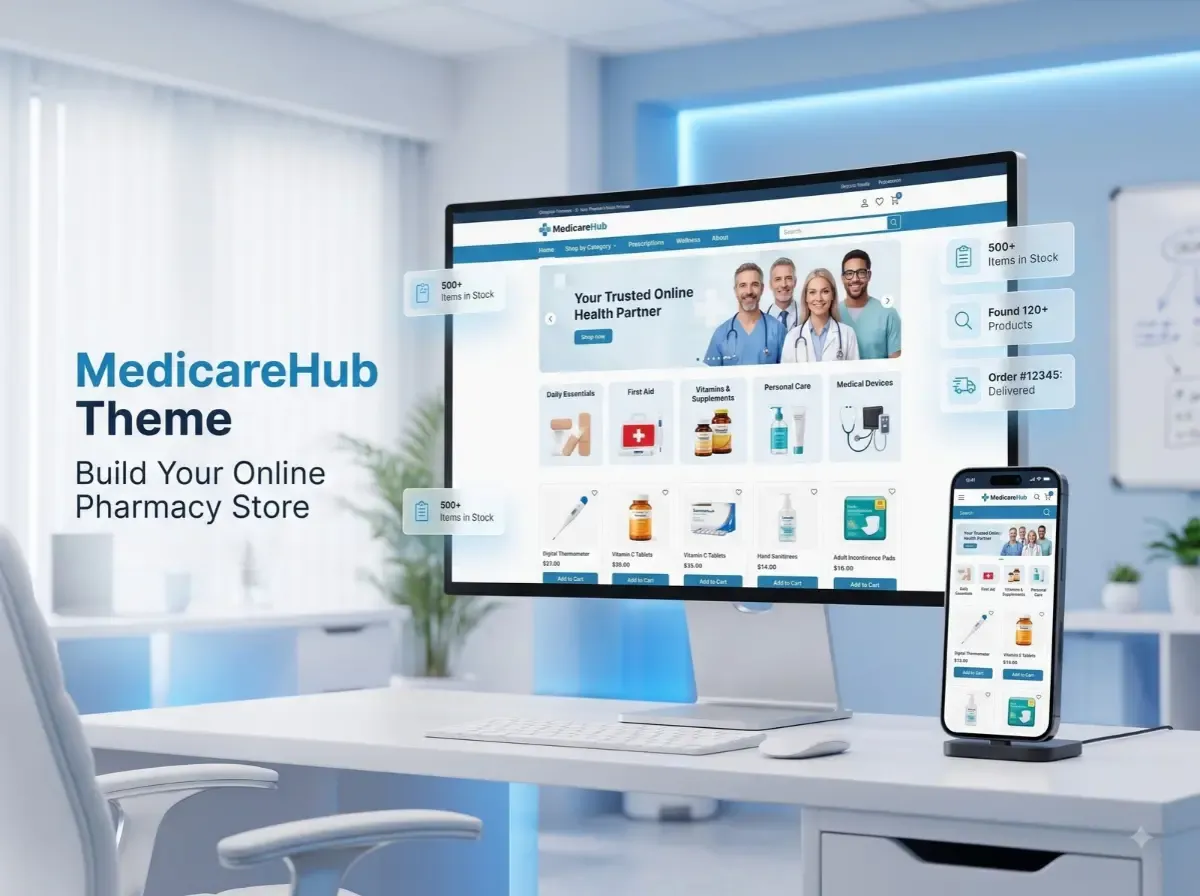
The MedicareHub Theme is a healthcare-focused nopCommerce theme that can give you a starting point for that storefront. According to the nopCommerce Marketplace listing, it is designed for healthcare and medical stores, with a responsive design, product filtering, quick view, and navigation features.
Still, a good online pharmacy store needs more than attractive design. Product data, inventory, integrations, security, fulfilment, and local regulations all need careful planning. This guide covers what to plan, where a healthcare theme helps, and where you will need plugins or custom work.

What Is the MedicareHub Theme?
A nopCommerce theme controls how your store looks and feels. It shapes the homepage, category pages, product pages, navigation, colours, typography, and overall layout. It does not replace the platform's core commerce engine, and it does not automatically add business logic such as prescription checks.
It helps to separate three layers:
Core nopCommerce features: catalog, customers, cart, checkout, orders, and administration.
Theme design: the visual layout and storefront experience.
Plugins and custom development: extra workflows, integrations, and business rules.
The MedicareHub Theme was created by Shivaay Soft for healthcare and medical stores. The official Marketplace listing describes it as having:
A clean, responsive design
Advanced product filtering
Quick view
Seamless navigation
The listing is titled "MedicareHub Theme + 12 plugins," so the package includes a set of plugins alongside the theme. The listing also shows support for nopCommerce 4.70, 4.80, and 4.90. Because versions and pricing change, check the listing for current details before you buy. A user guide is available in the MedicareHub documentation, and you can review the theme on the official MedicareHub page.
Why Use nopCommerce to Build an Online Pharmacy Store?
nopCommerce is an established eCommerce platform, and many of its core capabilities suit a pharmacy eCommerce website:
Product catalog management: create products, attributes, images, and stock information.
Category organization: build a clear category tree for browsing.
Customer accounts: let shoppers save addresses and review past orders.
Shopping cart and checkout: support a familiar purchase flow.
Order management: track and process orders from the admin area.
Payments and shipping: connect through plugins and providers.
Store administration: manage content, users, and settings in one place.
Customization: extend the platform through plugins and themes.
Be realistic about pharmacy-specific needs. Prescription upload, pharmacist review, age or purchase-limit rules, batch and expiry tracking, and regulatory reporting are not something you should assume come by default. Depending on your model, they may need third-party plugins, integrations, or custom development.
Key Features an Online Pharmacy Website Should Have
Treat this section as an evaluation checklist for any online pharmacy website. It is not a list of guaranteed MedicareHub features.
Clear Product Categories
Group products in a way customers already think: personal care, wellness, medical devices, first-aid, baby care, and other permitted healthcare items. Keep the depth manageable. Three levels is often enough for a healthcare product catalog.
Search and Product Filtering
Shoppers rarely browse a long catalog page by page. They search by product name, brand, or need, then narrow results by category, price, brand, or attributes such as pack size or form. The listing mentions advanced product filtering for the theme, but the filters you can actually offer depend on the attributes you set up in your catalog.
Detailed Product Pages
A strong product page includes:
A precise product name and clear images
Pack size and variants
A useful description
Ingredients, where applicable
Usage information and warnings
Any legally required labelling
Accuracy matters more than volume here. Have a qualified person review medicine-related content.
Mobile-Friendly Shopping
Many customers shop for health products on their phones. Use readable text, large tap targets, simple forms, and a short checkout. Test on real devices, not only in a browser preview.
Inventory and Order Management
Show stock status accurately, send order confirmations, and give customers a way to track deliveries. If you already run a pharmacy management system, plan how stock and orders will sync with the store.
Customer Support
Make contact details, delivery times, and return and refund policies easy to find. Healthcare buyers often want reassurance before they order.
How the MedicareHub Theme Helps Shape Your Pharmacy Storefront
The main value of a healthcare-focused theme is a faster, more relevant starting layout. Instead of adapting a general fashion or electronics design, you begin with a structure meant for medical retail.
Confirmed by the official listing: a clean, responsive design, advanced product filtering, quick view, and seamless navigation. The listing also mentions 12 bundled plugins .
General design considerations (apply these whatever theme you choose):
Homepage layout: lead with category entry points, search, and trust information such as contact details and delivery policy.
Product listing pages: keep filters visible and product cards consistent.
Category navigation: use clear labels and avoid crowded mega menus.
Product detail pages: put the information customers need to make a safe choice near the top.
Promotional sections: use them sparingly and follow advertising rules for health products.
Responsive presentation: check every template on phones and tablets.
Brand consistency: apply your logo, colours, and tone throughout.
Review the live demo linked from the Marketplace listing to judge whether the layout fits your catalog.
Step-by-Step Guide to Building an Online Pharmacy Store
Step 1: Define Your Business Model
Decide what you will sell, who you will serve, and how you will fulfil orders. Clarify early whether prescriptions or regulated products are involved. This decision affects almost everything that follows.
Step 2: Review Applicable Regulations
Identify the licensing, prescription-handling, product-sale, privacy, and delivery requirements in your jurisdiction. Do this before you build, not after.
Step 3: Set Up nopCommerce
Choose reliable hosting, install nopCommerce, configure store settings, and set up administrator accounts. Secure the environment from the start with HTTPS, restricted access, and a backup routine.
Step 4: Install and Configure the MedicareHub Theme
Confirm that your nopCommerce version matches the supported versions on the Marketplace listing. Then follow the official documentation. Install on a staging site first so you can test safely.
Step 5: Organize the Product Catalog
Plan categories, product attributes, descriptions, images, and inventory data before importing products. Clean data saves time later, and it improves search, filtering, and SEO.
Step 6: Configure Payments and Shipping
Choose providers that support your business model and product types. Some payment processors restrict health-related products, so read their policies first.
Step 7: Configure Required Plugins and Integrations
Identify what you need beyond the theme: ERP or inventory synchronization, customer notifications, analytics, and other workflows. Check plugin compatibility with your nopCommerce version.
Step 8: Test the Complete Customer Journey
Walk through the full path as a customer: navigation, search, product pages, cart, checkout, payment, order emails, inventory updates, and mobile use. Then test as an administrator.
Step 9: Launch and Monitor
After launch, watch for errors, speed problems, abandoned checkouts, customer feedback, fulfilment delays, and technical SEO issues. Fix small problems early.
Essential Integrations for an Online Pharmacy Store
Which integrations you need depends on your operations. Common categories include:
Payment gateways for card and local payment methods
Shipping and logistics for rates, labels, and tracking
ERP and inventory systems for stock and order synchronization
CRM and customer support tools for enquiries and follow-up
Accounting systems for invoicing and reconciliation
Analytics and reporting for traffic and sales insight
Email notifications for order and account messages
Product information management for large or frequently changing catalogs
Availability depends on the provider, your existing systems, version compatibility, and possible custom development. Do not assume any particular integration is part of the MedicareHub package unless the official documentation says so.
Security, Privacy, and Compliance Considerations
Pharmacies can handle sensitive personal and, depending on the model, prescription information. Security needs ongoing attention. Consider these basics:
Use HTTPS and a secure server configuration.
Require strong administrator authentication, ideally with multi-factor authentication where available.
Apply least-privilege access so staff only see what they need.
Keep nopCommerce, plugins, and the server up to date.
Handle customer information carefully and collect only what you need.
Plan backup and recovery, and test restores.
Follow your payment provider's security requirements.
Publish a clear privacy policy and define data-retention practices.
Installing a theme does not make a website secure or compliant. Those outcomes depend on configuration, hosting, processes, and people.
Legal Requirements for Selling Medicines Online
Rules for selling medicines online differ widely between countries, states, and product categories. What is allowed in one place may be prohibited in another.
Verify the following for your situation:
Pharmacy licences and business permissions
Prescription requirements
Rules for restricted or controlled medicines
Pharmacist involvement, where required
Product labelling and information requirements
Delivery and geographic restrictions
Customer privacy and data protection obligations
Advertising and promotional restrictions
This article is not legal advice. Consult the relevant regulator and qualified legal or pharmacy-compliance professionals before you accept orders.
SEO Best Practices for a Pharmacy eCommerce Website
A theme can support good SEO with clean markup and responsive layouts, but it will not rank a store on its own. Build the foundation deliberately:
Descriptive titles: write clear product and category titles for people first.
Unique descriptions: avoid copying manufacturer text across many products where practical.
Logical URLs: use short, readable paths that reflect the category structure.
Internal linking: connect related categories, products, and guides.
Breadcrumbs: help users and search engines understand hierarchy.
Images: compress them and add descriptive alt text.
Mobile responsiveness: check layouts on real devices.
Page speed and Core Web Vitals: measure them and fix slow templates or heavy scripts.
XML sitemap and crawlability: make sure important pages can be found.
Canonical URLs: reduce duplicate-content issues from filters and variants.
Structured data: use Product, BreadcrumbList, and Organization markup where appropriate.
Health content also benefits from clear authorship, accurate information, and reliable sources. No one can promise rankings, so focus on quality and technical health.
MedicareHub Theme vs a Generic nopCommerce Theme
Neither option is automatically better. The right choice depends on your product catalog, required workflows, design preferences, technical requirements, and budget. A healthcare-focused theme can shorten the design phase, but a generic theme with heavy customization may suit unusual requirements.
When Should You Consider Customization?
The base theme may not cover everything. Consider additional work for:
Custom product attributes
Specialized search and filters
Inventory synchronization
ERP integration
Custom order workflows
Customer-specific pricing
Additional admin functionality
Custom reporting
Brand-specific storefront changes
These are examples of possible customization, not promises of built-in MedicareHub functionality. nopCommerce theme customization and nopCommerce plugin integration should be scoped, tested, and documented, particularly when they touch orders or customer data.
Why Consider Shivaay Soft for nopCommerce Development?
Shivaay Soft is the developer behind the MedicareHub Theme. Its nopCommerce partner profile describes a team that builds customized themes, plugins, APIs, and third-party integrations on .NET and ASP.NET, and that also handles nopCommerce upgrades.
Relevant services for a pharmacy project may include:
nopCommerce theme implementation and customization
nopCommerce plugin development
Third-party integrations
Store customization
nopCommerce upgrades
Technical support
Before starting, discuss your requirements, version compatibility, implementation scope, testing, and ongoing support. You can reach the team through the Shivaay Soft contact page. Ask for a clear scope and timeline, and compare it with your own feature list.
Conclusion
A healthcare-focused design can be a sensible starting point for an online pharmacy store, but design is only one layer. Strong product data, dependable integrations, mobile usability, security, SEO, and legal compliance decide whether the store works in practice.
Evaluate the MedicareHub Theme against your actual requirements and its verified specifications, including supported nopCommerce versions. A practical next step: review the official MedicareHub Theme details, explore the demo, and prepare a written list of required features before implementation begins.