

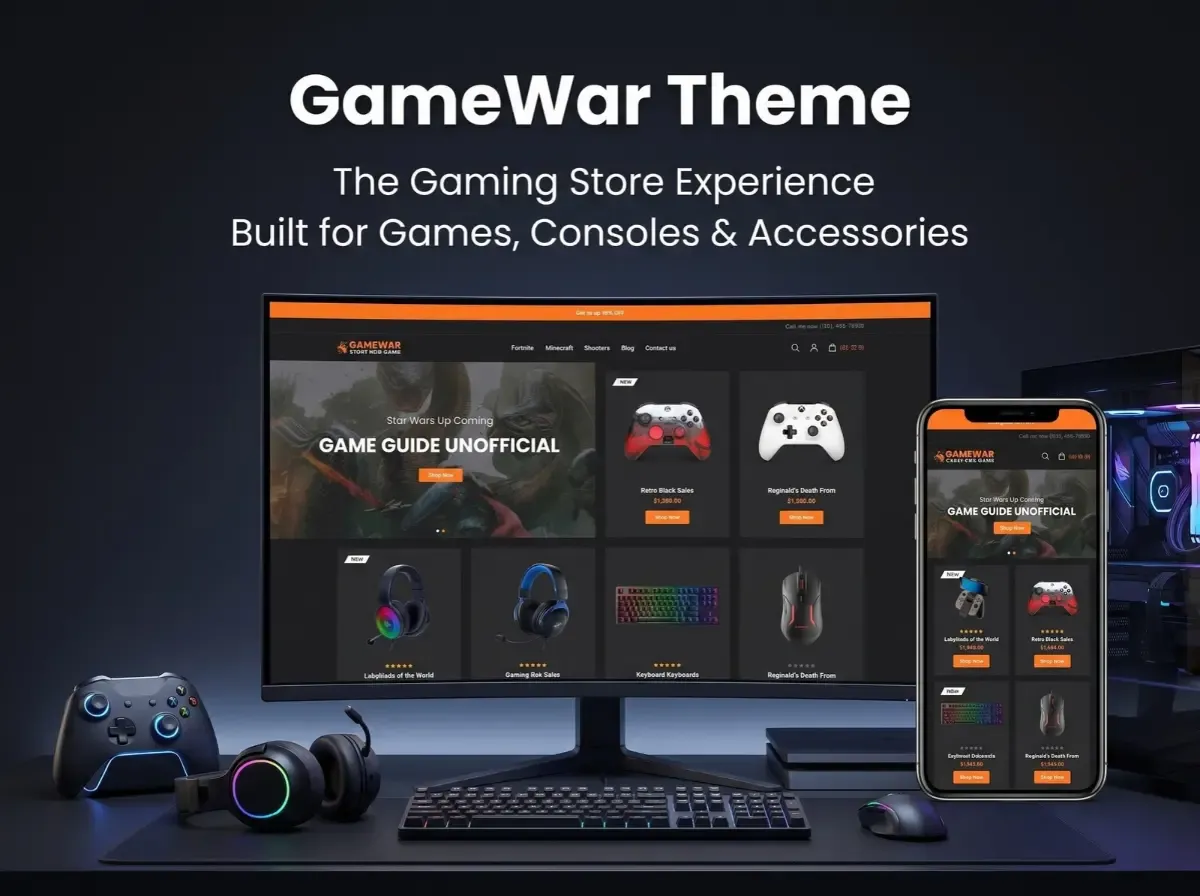
A gaming retailer rarely sells one kind of product. One shopper wants a new release for PlayStation. Another is comparing controllers. A third needs a headset that works with both a console and a PC. If your storefront treats all of these the same way, shoppers struggle to find what they came for.
That is why theme choice matters for a gaming eCommerce website. The GameWar Theme is a gaming-focused option for nopCommerce that is worth evaluating if you are building or redesigning a video game online store.
Looks are only part of the decision. You also need to check product discovery, layout flexibility, version compatibility, performance and how easily the theme can be customized later. This guide covers each of these using details from the official product pages.

What Is the GameWar Theme?
A nopCommerce theme controls how your store looks and feels. It shapes layout, typography, navigation, product listings and branding. It does not replace the platform's core features, and it does not automatically add business logic like ERP sync or custom filters. Those come from nopCommerce itself, plugins or custom development.
According to Shivaay Soft, GameWar is a premium nopCommerce theme with a modern design, a dark mode layout and a customizer option. The official pages describe it as suitable for video games, puzzle and sports products, movies, PlayStation items, digital items, electronics, mobile products and other gaming accessories.
Here are the specifications confirmed on the official product page:
Supported nopCommerce versions: 4.60 and 4.70
Eight plugins included
Multi-store and multi-vendor support
RTL (right-to-left) support
Clean HTML and CSS structure
Public view (.cshtml) files open to modification
Fully localizable for any language
Tested with all major browsers
One year of free support and upgrades from the purchase date
The license is tied to the domain you enter at purchase, so confirm your production domain first. The nopCommerce Marketplace lists the theme as "Dark Digital Store-GameWar." The two pages show different prices (see the note at the end), so check the current price before budgeting.
Why Choose a Gaming-Focused nopCommerce Theme?
A generic retail theme can sell games. But a gaming storefront has different needs, and a purpose-built theme gives you a more relevant starting point.
Gaming shoppers tend to browse visually. They respond to bold product art, clear category paths and prominent promotional areas for launches and bundles. A dark layout also suits the category, and it can make cover art and hardware photography stand out.
A gaming-focused theme can help with:
Gaming-oriented branding that feels native to the audience
Product-focused layouts where imagery leads
Organized categories for platforms, genres and hardware
Promotional areas for releases, offers and seasonal campaigns
Consistent branding across desktop and mobile
A theme does not guarantee more sales or higher conversion. It gives you a stronger foundation. The results depend on your catalog, pricing, content and execution.
What Products Can You Sell With a Gaming eCommerce Store?
Here are common catalog categories for a gaming store website design. These are examples of what a store can sell, not features built into GameWar.
Video games. Organize by platform, genre, publisher and release date. Platform is usually the most important filter, because a PlayStation buyer should not wade through Xbox titles.
Gaming consoles. Console pages need clear specifications, storage size, included items and bundle details. Compatibility notes save support time.
Controllers and accessories. Think controllers, charging docks, cables and storage add-ons. Shoppers often buy these alongside a console, so related-product links matter.
PC gaming hardware. Keyboards, mice, headsets and other peripherals fit here. Listing connection type and platform support helps buyers avoid mistakes.
Gaming chairs and merchandise. A broader catalog can include furniture and branded goods. These products need different attributes, such as dimensions or materials.
Essential Features of a Gaming Store Website
When you evaluate any nopCommerce gaming theme, look at these areas. Note which come from core nopCommerce, which from the theme and which need plugins.
Product catalog and categories. Core nopCommerce supports category hierarchies. Your job is to design a logical tree: games, consoles, accessories and PC gaming, with sensible subcategories.
Search, filters and sorting. nopCommerce provides search and catalog filtering. Filters by platform, brand, price or compatibility depend on how you set up product attributes and specifications. Advanced filtering may need a plugin or custom work.
Product detail pages. Strong pages show multiple images, specifications, compatibility, availability, delivery information, warranty details and variations. The theme controls presentation. You supply the data.
Promotional merchandising. Banners and featured sections announce launches, bundles and offers. Check how the theme presents them and how easily your team can update them.
Mobile-friendly shopping. Look for readable product cards, easy tap targets and a simple checkout. Always test on real devices.
Cart and checkout. Hardware buyers want clarity on price, shipping and delivery. nopCommerce provides the checkout engine, and the theme styles it. The official page shows a dedicated cart design.
How the GameWar Theme Supports Gaming Store Design
Based on the official documentation, GameWar offers a dark-mode design and a customizer for adjusting the look of the store. Its clean HTML and CSS structure and modifiable .cshtml files give developers room to adapt layouts.
In practice, that supports several goals:
Product presentation: a dark layout suits cover art and hardware shots
Brand identity: the customizer lets you adjust the look to match your brand
Product browsing and category navigation: you can shape this through your catalog structure and layout edits
Responsive storefront experiences: confirm this on the live demo and on your own devices, since the official pages mention browser testing but do not detail responsive behavior
If you need something not listed above, such as a compatibility checker or a bundle builder, treat it as a customization or compatible plugin, not an included feature.
How to Build a Gaming eCommerce Store With GameWar
Here is a practical roadmap for gaming eCommerce website development.
Step 1: Define the product range. Decide whether you will focus on consoles, PC gaming, video games, accessories or a mix. This drives your categories and attributes.
Step 2: Set up nopCommerce. Arrange hosting, install the platform, configure store settings and set up administrator access.
Step 3: Check GameWar compatibility. The official page lists versions 4.60 and 4.70. Confirm your nopCommerce version matches before you buy.
Step 4: Install and configure the theme. Follow the official installation instructions, then set up the storefront to match your brand.
Step 5: Organize the catalog. Build categories, product attributes, images, specifications and related-product links. This step takes the most time and has the biggest effect on usability.
Step 6: Configure payments and shipping. Choose providers for your market and test each workflow.
Step 7: Add plugins and integrations. Evaluate ERP, inventory sync, marketing tools and reporting. Check each plugin's compatibility with your nopCommerce version and theme.
Step 8: Test the store. Run through search, navigation, product pages, cart, checkout, mobile layouts and order notifications.
Step 9: Launch and monitor. Watch performance, errors, customer feedback, inventory accuracy and technical SEO.
GameWar Theme vs a Generic nopCommerce Theme
Neither option wins in every case. The right choice depends on your catalog, brand, user experience needs, integrations and customization budget.
Customization and Integrations for Gaming Stores
Most serious gaming stores outgrow a theme's defaults. These are common areas where extra development may help. None are promised by GameWar by default.
Custom product filters
Console and accessory compatibility information
Product comparison
Bundle management
ERP and inventory integration
Shipping integration
Customer-specific pricing
Custom promotional landing pages
Product notifications
Custom reporting
nopCommerce's plugin architecture lets you add many of these without editing core files, which makes later upgrades easier. A good custom nopCommerce theme or nopCommerce theme customization project starts with a clear list of required features, so you only pay for what you need.
SEO Best Practices for a Gaming eCommerce Website
A theme gives you a clean front end. It does not guarantee rankings. Build the foundation yourself:
Descriptive titles for categories and products that include platform and product type
Unique product descriptions instead of copied manufacturer text
Clean URLs that reflect your category structure
Internal linking between related games, consoles and accessories
Breadcrumbs to show hierarchy to users and search engines
Optimized images in compressed formats with descriptive filenames
Descriptive alt text for product images
Mobile usability checked on real devices
Page speed and Core Web Vitals monitored regularly
XML sitemap submitted to search engines
Canonical URLs to handle duplicate or filtered pages
Product structured data that matches visible page content
Performance and Compatibility Considerations
Before you commit, work through this checklist:
Supported versions: the official page lists nopCommerce 4.60 and 4.70
Plugin compatibility: test every plugin together with the theme
Image optimization: gaming stores are image-heavy, so compress and size images properly
Page weight: limit heavy sliders, scripts and unused assets
Caching and performance settings: configure them for your hosting setup
Mobile and browser testing: the official page notes testing with major browsers, but run your own checks
Upgrade testing: retest the theme after every platform or plugin update
Staging environment: apply changes there first, never on the live store
Documentation and support: the official page mentions one year of free support and upgrades from purchase
We have not listed benchmark figures because none are published on the official pages. Measure your own store with your own data.
Who Should Consider the GameWar Theme?
GameWar may suit:
Video game retailers
Gaming console sellers
Gaming accessory businesses
PC gaming stores
Businesses launching a specialized gaming storefront
Existing nopCommerce stores planning a visual redesign
If your business has complex requirements, such as unusual workflows, heavy integrations or a very distinct brand, you may need extra development or a different theme approach.
Why Consider Shivaay Soft for nopCommerce Theme Customization?
Shivaay Soft is a Surat-based company that works with nopCommerce and is listed as a nopCommerce Gold Solution Partner. Its services include theme development and customization, plugin development, third-party integrations, store development and migration and upgrade work.
Before starting any project, confirm the scope, supported versions, compatibility, customization requirements and maintenance arrangements in writing. That protects both sides and avoids surprises later.
Conclusion
Theme selection shapes how shoppers find and judge your products. For a gaming store with games, consoles and accessories, a gaming-focused design can be a sensible starting point.
The GameWar Theme is worth evaluating as that kind of option. Final suitability still depends on verified features, version compatibility, your catalog needs, customization plans and budget.
Your next step: review the official GameWar product details, then list the features your store requires. Compare that list against what the theme includes and decide what needs plugins or custom work.
Frequently Asked Questions
.cshtml) files that are open to modification. Developers can adjust layouts and styling. Larger changes, such as new features, usually need plugins or custom development.