

Ten years ago, fast shipping meant two days. Today, in most major cities across the US, UK, Canada, Australia, UAE, Saudi Arabia, and India, customers expect their grocery order, medicine, or last-minute gift to arrive within hours, sometimes within thirty minutes. That shift didn't happen because customers became less patient. It happened because a new category of retail infrastructure made same-day and same-hour fulfillment operationally possible: hyperlocal eCommerce.
Traditional eCommerce solves a distribution problem of getting a product from a central warehouse to a customer's doorstep, anywhere in the country. Hyperlocal eCommerce solves a different problem entirely: match a customer with the nearest available seller who can fulfill the order right now, then get it delivered within a tight local radius. That single shift from "ship from anywhere" to "fulfill from nearby" changes almost everything about how the underlying platform needs to be built.
This is where the conversation gets complicated for business owners and technology decision-makers. A hyperlocal marketplace isn't just an online store with a delivery checkbox. It's a system that has to know where the customer is, which vendors are near them, what those vendors actually have in stock right now, which delivery partner can reach that specific pin code, and how to route the order in seconds all while keeping the storefront fast, secure, and easy to manage.
This is why more marketplace owners, retail groups, and startups are evaluating hyperlocal eCommerce with nopCommerce as their foundation. nopCommerce brings a mature, open-source, ASP.NET Core platform with genuine multi-vendor and multi-store capabilities, a large plugin ecosystem, and the flexibility to support the kind of custom business logic that hyperlocal commerce demands. It isn't a hyperlocal platform out of the box nobody's is but it's an excellent starting point for building one, provided the architecture is planned correctly from day one.
In this guide, we'll walk through what hyperlocal eCommerce actually means, how it works end to end, why nopCommerce is a strong technical foundation, which features and integrations a real hyperlocal marketplace needs, and how to architect, build, and scale one without hitting a wall at 500 vendors or 50,000 SKUs.
What Is Hyperlocal eCommerce?
Hyperlocal eCommerce is a model where products are sourced from sellers located close to the customer and delivered within a small, defined geographic radius usually within a few kilometers or miles, often within hours rather than days.
It relies on a few core building blocks:
Local sellers grocery stores, pharmacies, restaurants, electronics shops, or distributors operating within a specific city or neighborhood.
Geographic targeting the platform understands and enforces service boundaries rather than treating the whole country as one shipping zone.
Local inventory stock levels are tracked at the store or warehouse level, not just at a single central warehouse.
Delivery zones each vendor or fulfillment point serves a defined radius, and orders outside that radius simply aren't offered that vendor as an option.
Same-day or rapid delivery because the seller is physically close, delivery windows shrink from days to hours.
Location-based product discovery search results and product availability change depending on where the customer is standing (or where their delivery address is set).
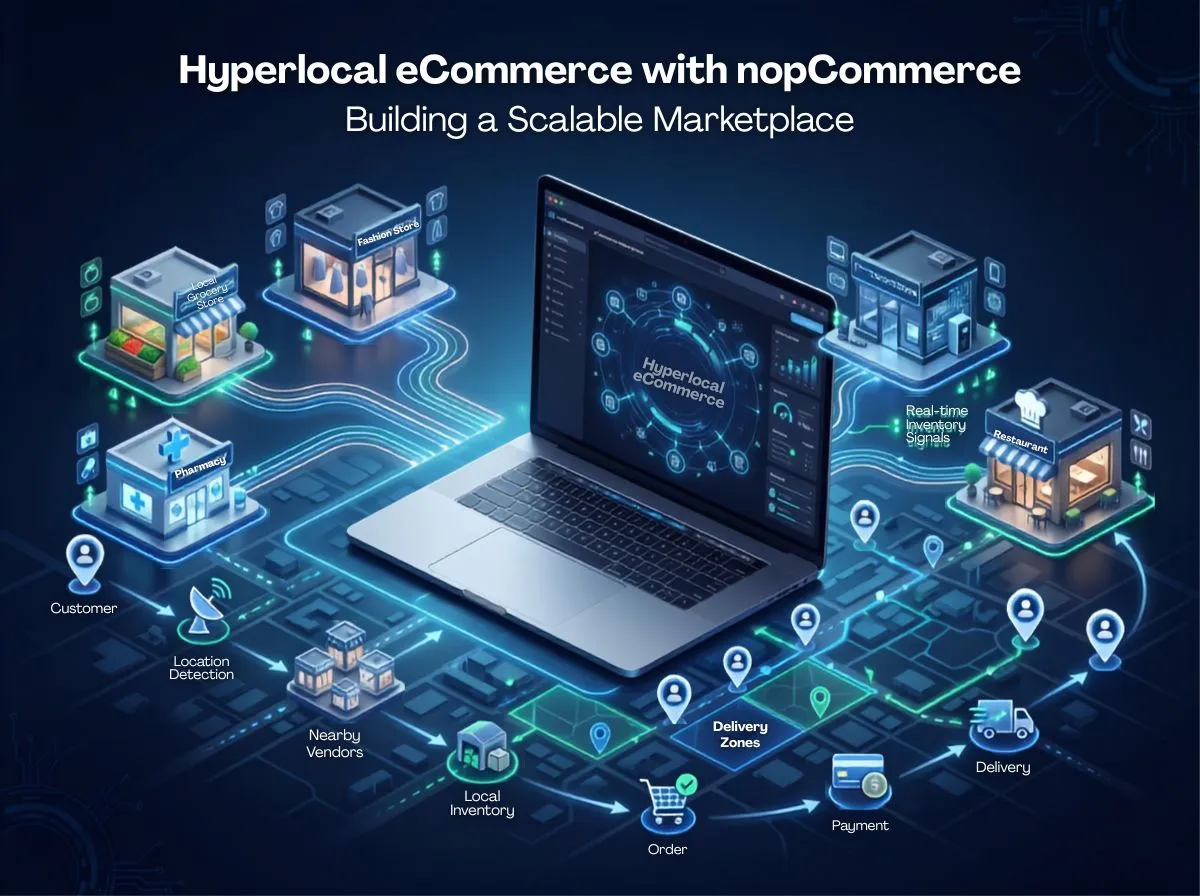
Here's a simple real-world flow that illustrates the model:
Customer searches for a product
↓
Location is detected
↓
Nearby vendors are identified
↓
Available inventory is checked
↓
Best seller is selected
↓
Order is placed
↓
Local delivery is assigned
Notice what's different here compared to a standard online store: the same search from two customers in two different neighborhoods can return two completely different sets of sellers, prices, and delivery times. That's the essence of hyperlocal commerce: the catalog isn't static, it's contextual to location.
Hyperlocal eCommerce vs Traditional eCommerce
The technology gap in the bottom two rows is where most hyperlocal projects succeed or struggle. A platform built only for traditional eCommerce simply doesn't have the data model or logic to answer "which of my 40 nearby vendors can fulfill this order right now" - that capability has to be designed in.
How Does a Hyperlocal Marketplace Work?
A hyperlocal marketplace is really a sequence of real-time decisions stacked on top of a standard eCommerce transaction. Here's the full customer journey:
Location Detection The platform captures the customer's location, either through browser geolocation, a saved delivery address, or manual pin code/postal code entry. This location becomes the filter for everything downstream.
Product Search The customer searches or browses. Instead of querying the entire catalog, the system narrows results to products available from vendors serving that location.
Nearby Vendor Matching The system identifies which vendors have a service radius that covers the customer's location, and ranks them by distance, rating, or fulfillment speed.
Inventory Verification Before showing "in stock," the platform checks real, current stock at the specific vendor location, not a generic catalog flag.
Pricing Vendors may price the same product differently. The platform needs to show accurate, vendor-specific pricing rather than one universal price.
Checkout and Payment Standard eCommerce checkout, but the order needs to carry vendor, location, and delivery-zone metadata all the way through.
Order Routing If more than one vendor can fulfill the order, the system decides which one gets it, based on rules like proximity, stock, and capacity.
Vendor Fulfillment The chosen vendor is notified and prepares the order often through a vendor dashboard or app.
Delivery A delivery partner (in-house fleet or third-party API) is assigned based on zone and availability.
Order Tracking The customer follows the order status in near real time, from confirmation to doorstep.
Every one of these stages needs to be fast. A customer comparing grocery delivery apps won't wait ten seconds for a product search to resolve this is why architecture and performance planning (covered later in this guide) matter as much as the feature list.
Why Choose nopCommerce for Hyperlocal eCommerce?
nopCommerce is a mature, open-source eCommerce platform built on ASP.NET Core. It's a reasonable foundation for hyperlocal marketplaces for a specific set of reasons and it's important to be honest about what it does and doesn't provide natively.
What nopCommerce brings to the table:
ASP.NET Core architecture is a modern, high-performance, cross-platform framework that supports clean separation of concerns, dependency injection, and enterprise-grade extensibility.
Open-source flexibility and full access to source code means business logic can be customized at a depth that SaaS platforms typically don't allow.
Multi-vendor capabilities nopCommerce has built-in vendor accounts, vendor product ownership, and vendor-specific order visibility, which is a genuine head start for marketplace models.
Multi-store capabilities a single installation can power multiple storefronts (useful for city-specific or region-specific branding) sharing one backend.
Plugin ecosystem a well-defined plugin architecture lets you add functionality without touching core code, which matters enormously for long-term maintainability.
API integration support Web API capabilities allow connection to external services (maps, delivery, ERP, payment).
Scalability and security fundamentals support load balancing, caching layers, and standard ASP.NET Core security practices.
What it's important not to assume:
nopCommerce does not ship with hyperlocal features out of the box. There's no native geolocation-based vendor matching, no built-in delivery-zone engine, no automatic order routing by proximity, and no real-time multi-location inventory sync as a default feature. These are the capabilities that make a marketplace "hyperlocal," and they have to be added.
It's worth being explicit about the three categories of work involved:
Native capabilities multi-vendor accounts, multi-store, product catalog, checkout, basic shipping methods, plugin framework.
Custom development geolocation-based search, delivery-zone logic, order routing engine, vendor-specific delivery slots, commission and payout workflows tailored to your business rules.
Third-party integrations maps/geocoding APIs, delivery and logistics platforms, payment gateways, SMS/notification services, ERP/POS systems.
Any vendor or agency that tells you nopCommerce "already does hyperlocal" out of the box is not giving you an accurate picture. The honest pitch and the one that leads to a marketplace that actually works is that nopCommerce gives you a solid, extensible core, and a well-planned combination of custom plugins and integrations builds the hyperlocal layer on top of it.
Essential Features of a Hyperlocal nopCommerce Marketplace
1. Location-Based Product Search
What it does: Filters and ranks search results based on the customer's current or saved delivery location, so they only see products actually available near them.
Why it matters: Showing products that can't be delivered locally creates cart abandonment and support complaints.
Implementation: Requires a custom search layer that combines nopCommerce's product catalog with vendor location data and delivery-zone boundaries, typically backed by a geospatial-capable index (Elasticsearch or a similar search engine with geo-query support).
Custom development or integration: Custom development, using a geo-aware search backend.
2. Vendor Location Management
What it does: Captures precise vendor coordinates, service address, and operating details.
Why it matters: Every downstream feature search, delivery zones, order routing depends on accurate vendor location data.
Implementation: Extend the nopCommerce vendor entity with geocoordinates and address metadata, populated via a geocoding API during vendor onboarding.
Custom development or integration: Custom development plus a geocoding API integration.
3. Service Area / Delivery Zone Management
What it does: Defines the geographic boundary each vendor can serve a radius, a polygon, or a list of postal codes.
Why it matters: Prevents vendors from being matched to customers they physically can't serve.
Implementation: A custom plugin storing zone definitions per vendor, checked during vendor matching and checkout.
Custom development or integration: Custom development.
4. Local Inventory Management
What it does: Tracks stock per vendor location rather than one global stock count.
Why it matters: A product may be in stock at one store and out of stock two kilometers away — the platform must reflect that accurately.
Implementation: Extend nopCommerce's stock quantity model to be vendor/location-aware, and expose it through APIs for real-time checks.
Custom development or integration: Custom development, often paired with ERP/POS integration.
5. Multi-Vendor Management
What it does: Onboards, verifies, and manages many independent sellers on one platform.
Why it matters: Vendor quality and reliability directly affect customer trust in the marketplace.
Implementation: Builds on nopCommerce's native vendor module, extended with approval workflows, document verification, and performance dashboards.
Custom development or integration: Native capability, extended with custom development.
6. Vendor-Specific Pricing
What it does: Allows each vendor to set their own price for the same product.
Why it matters: Local pricing varies by store cost structure, competition, and margin strategy.
Implementation: nopCommerce supports vendor-owned products; pricing rules and price comparison logic across vendors need custom extension.
Custom development or integration: Native capability with custom extension for cross-vendor price comparison.
7. Vendor Product Management
What it does: Gives vendors self-service tools to list, edit, and manage their own products.
Why it matters: A marketplace can't scale if every product update goes through a central admin team.
Implementation: nopCommerce's vendor panel already supports this; it typically needs UX refinement and bulk-upload tooling for larger vendors.
Custom development or integration: Native capability, extended with custom tooling.
8. Real-Time Inventory Synchronization
What it does: Keeps online stock counts aligned with actual in-store or warehouse stock, ideally in near real time.
Why it matters: Overselling out-of-stock items is one of the fastest ways to lose customer trust in a hyperlocal model.
Implementation: API-based sync with vendor POS/ERP systems, using webhooks or scheduled polling depending on system capability.
Custom development or integration: Custom development plus ERP/POS integration.
9. Order Routing
What it does: Automatically decides which vendor fulfills an order when multiple vendors could.
Why it matters: Manual assignment doesn't scale past a handful of vendors and slows down fulfillment.
Implementation: A rules-based (and later, potentially weighted/scored) routing engine built as a custom plugin, evaluating proximity, stock, vendor capacity, and rating.
Custom development or integration: Custom development.
10. Local Delivery Management
What it does: Coordinates delivery assignment, charges, and status within defined zones.
Why it matters: Delivery is the operational core of hyperlocal commerce — get it wrong and the rest of the platform doesn't matter.
Implementation: Custom plugin or integration with a third-party delivery/logistics API.
Custom development or integration: Mix of custom development and third-party integration.
11. Delivery Slot Selection
What it does: Lets customers choose a preferred delivery window.
Why it matters: Predictability matters as much as speed for many customers, especially for scheduled or bulk orders.
Implementation: Custom checkout extension tied to vendor capacity and delivery partner availability.
Custom development or integration: Custom development.
12. Same-Day Delivery
What it does: Fulfills and delivers an order within the same business day, often within hours.
Why it matters: It's the defining customer expectation that separates hyperlocal from traditional eCommerce.
Implementation: Dependent on order routing speed, vendor readiness, and delivery partner capacity a process outcome as much as a feature.
Custom development or integration: Custom development plus delivery integration.
13. Customer Location Detection
What it does: Captures the customer's current location automatically or through address selection.
Why it matters: It's the trigger for every other hyperlocal feature on this list.
Implementation: Browser geolocation API combined with a saved-address system and manual pin code fallback.
Custom development or integration: Custom development.
14. Store Pickup
What it does: Allows customers to order online and collect from a nearby vendor location.
Why it matters: Reduces delivery cost and appeals to customers who want the item immediately.
Implementation: Custom checkout option tied to vendor location and readiness status.
Custom development or integration: Custom development.
15. Vendor Ratings and Reviews
What it does: Lets customers rate vendors based on product quality, accuracy, and delivery experience.
Why it matters: Trust signals matter more in a multi-vendor environment where quality can vary store to store.
Implementation: nopCommerce supports product reviews natively; vendor-level rating aggregation typically needs custom extension.
Custom development or integration: Native capability with custom extension.
16. Location-Based Promotions
What it does: Runs discounts or offers targeted to specific zones, stores, or cities.
Why it matters: Local competitive dynamics differ; a blanket national promotion often isn't the right lever.
Implementation: Extend nopCommerce's discount engine with location and vendor-zone conditions.
Custom development or integration: Custom development.
17. Geo-Targeted Marketing
What it does: Sends location-relevant marketing messages — new vendor in the area, local offers, restock alerts.
Why it matters: Relevance drives engagement far more than generic campaigns.
Implementation: Integration with an email/SMS/push platform, segmented by saved customer location.
Custom development or integration: Third-party integration plus custom segmentation logic.
18. Multi-Store Support
What it does: Runs separate branded storefronts (e.g., by city) from one shared backend.
Why it matters: Some hyperlocal businesses want distinct local branding without maintaining separate platforms.
Implementation: nopCommerce's native multi-store feature, configured per city or region.
Custom development or integration: Native capability.
19. Mobile-Friendly Storefront
What it does: Delivers a fast, responsive experience across devices, since hyperlocal shopping skews heavily mobile.
Why it matters: Most hyperlocal orders, especially grocery and food are placed on a phone, often while a customer is out and in a hurry.
Implementation: Responsive theme development, optimized for performance on mobile networks.
Custom development or integration: Custom theme development.
20. Order Tracking
What it does: Shows real-time order and delivery status to the customer.
Why it matters: Reduces "where is my order" support volume and builds trust in fast-delivery promises.
Implementation: Integration with delivery partner tracking APIs, surfaced through the storefront and notifications.
Custom development or integration: Custom development plus third-party integration.
Hyperlocal Marketplace Architecture
A hyperlocal marketplace built on nopCommerce is best thought of as layers, each responsible for a distinct part of the workflow:
Customer Storefront The web and/or mobile front end where customers search, browse, and check out. This layer talks to the nopCommerce application through its APIs and controllers, and is where location capture happens first.
nopCommerce Application The core platform: catalog, cart, checkout, customer accounts, vendor accounts, and the plugin framework that everything else plugs into.
Marketplace / Vendor Layer Custom logic sitting on top of nopCommerce's native vendor module: onboarding workflows, vendor zones, vendor-specific pricing rules, and commission structures.
Location & Geo Services Geocoding, distance calculation, and zone-matching logic, typically powered by a maps/geolocation API and a custom service layer that nopCommerce calls into.
Inventory Layer Vendor and location-specific stock data, synchronized with ERP/POS systems and exposed to the storefront through fast read paths (often cached).
Order Management Extends nopCommerce's order processing to carry vendor assignment, delivery zone, and routing decisions through the full order lifecycle.
Payment Gateway Handles customer payment capture and, in marketplace models, needs to support the split between platform commission and vendor payout.
ERP / POS Vendor-side systems that need to stay synchronized with the marketplace for inventory, pricing, and order fulfillment status.
Shipping / Delivery APIs Third-party or in-house delivery platforms that receive routed orders and return tracking and status updates.
Analytics Aggregates data across vendors, zones, and orders to give the marketplace owner visibility into performance, demand patterns, and vendor reliability.
Data flows in both directions through this stack: customer actions flow down (search → location → inventory → order), and fulfillment updates flow back up (vendor confirms → delivery assigned → status pushed to customer). Getting this bidirectional flow right, especially the speed of inventory checks and order routing is what determines whether the marketplace feels instant or sluggish to end users.
Best APIs and Integrations for Hyperlocal Commerce
No single vendor is always the best choice; the right API depends on target market, budget, and existing vendor relationships. Here are the categories a hyperlocal nopCommerce marketplace typically needs to evaluate:
Google Maps / Maps APIs geocoding, distance matrix, and place autocomplete for location capture and zone calculation.
Geolocation APIs browser and IP-based location detection as a fallback to GPS.
Payment Gateways region-appropriate providers supporting split payments or marketplace payout models where needed.
Shipping APIs for orders that fall outside pure hyperlocal delivery (e.g., regional shipping for non-urgent items).
Delivery Platforms on-demand local delivery networks or in-house fleet management systems.
ERP for vendors and central operations to synchronize inventory, pricing, and purchase orders.
POS particularly for retail and grocery vendors who manage in-store sales alongside online orders.
CRM to manage customer relationships, support history, and loyalty programs.
SMS order confirmations, delivery updates, and OTP verification.
Email transactional and marketing communication.
Push Notifications real-time order and delivery status updates on mobile.
Tax APIs for markets with complex, location-dependent tax rules.
Inventory Systems standalone inventory management tools for vendors without a full ERP.
Selecting the right combination is a scoping exercise specific to each business's vendor base, target geography, and operational maturity, not a one-size-fits-all list.
How to Manage Local Inventory in nopCommerce
Local inventory is arguably the hardest operational problem in hyperlocal commerce, because it depends on data accuracy from third parties (vendors) that the marketplace doesn't fully control.
There are a few layers worth separating clearly:
Vendor inventory stock owned and managed by an individual vendor account.
Store-level inventory for vendors with multiple physical locations, stock tracked per store.
Warehouse inventory for marketplace-owned or centralized fulfillment stock, separate from vendor stock.
Inventory reservations temporarily hold stock once a customer starts checkout, to prevent overselling during high-traffic windows.
Stock synchronization keeping the marketplace's stock numbers aligned with the vendor's actual POS/ERP stock.
Out-of-stock handling deciding what happens when a product goes out of stock mid-checkout: substitute, cancel, or notify.
Inventory APIs the interface vendors' systems use to push or pull stock updates.
ERP synchronization scheduled or event-driven sync jobs that reconcile marketplace and vendor-side records.
A practical example: A regional pharmacy chain with 40 branches lists its catalog on the marketplace. Each branch has its own stock levels in its POS system. Rather than manually updating stock on the marketplace, the POS pushes stock changes through a webhook every time an item is sold in-store or online. The marketplace's inventory layer receives this update, adjusts the store-specific stock count, and if stock hits zero automatically removes that branch from the pool of vendors offering the product to nearby customers, without affecting the other 39 branches' listings.
How Order Routing Works in a Hyperlocal Marketplace
Order routing is the decision engine that determines which vendor actually fulfills an order when more than one vendor could. It typically evaluates:
Nearest seller proximity to the customer's delivery address.
Available inventory confirmed, real-time stock at that vendor.
Delivery radius whether the customer falls inside the vendor's serviceable zone.
Delivery capacity whether the vendor (or assigned delivery partner) can handle another order in the current time window.
Seller pricing where price differences exist, whether proximity or price should take priority.
Customer-selected delivery time whether the vendor can meet a specific requested slot.
An illustrative order-routing workflow:
Order placed for "2kg rice, 1L milk"
↓
System identifies 4 vendors within 3km
↓
Vendor A: out of stock on milk > excluded
↓
Vendor B: in stock, but delivery capacity full for next hour > deprioritized
↓
Vendor C: in stock, 1.2km away, capacity available > selected
↓
Order routed to Vendor C
↓
Vendor C confirms and begins fulfillment
This routing logic is one of the areas where custom development isn't optional; it's the core intellectual property of a hyperlocal marketplace, and it should be built as a dedicated, testable plugin rather than scattered logic inside checkout code.
Hyperlocal Delivery Management
Delivery is where hyperlocal commerce is won or lost operationally. Key components include:
Delivery zones defined boundaries per vendor or per fulfillment hub.
Delivery partners in-house riders, third-party delivery networks, or a hybrid mix.
Delivery charges flat fee, distance-based, or free above a threshold.
Minimum order value thresholds that make delivery economically viable for vendors.
Delivery slots scheduled windows customers can choose from.
Same-day delivery is the default expectation in most hyperlocal categories.
Pick up an alternative for customers who prefer to collect in person.
Real-time tracking visibility into rider location and estimated arrival.
Delivery status clear state transitions (confirmed, preparing, out for delivery, delivered).
Failed deliveries handling for missed attempts, refused orders, or unreachable customers, including re-attempt and refund logic.
Each of these needs to be represented as data the marketplace can query and act on — not just a status label shown to the customer, but a state that order routing, vendor dashboards, and customer notifications all read from consistently.
Custom nopCommerce Plugins for Hyperlocal eCommerce
Rather than modifying nopCommerce's core codebase, hyperlocal capability should be added through custom plugins. This matters for a very practical reason: core modifications make every future nopCommerce upgrade risky and expensive, while plugins isolate custom logic and keep the platform upgradeable.
Common custom plugins for a hyperlocal marketplace include:
Geo-location plugin captures and stores customer and vendor coordinates, integrates with a maps API.
Vendor matching plugin filters and ranks vendors by proximity and service zone.
Local inventory plugin manages store/location-level stock beyond nopCommerce's default model.
Delivery zone plugin defines and enforces vendor service boundaries.
Order routing plugin the rules engine described above.
Delivery slot plugin manages available time windows per vendor and delivery capacity.
Vendor commission plugin calculates platform commission and vendor payout per order.
Local promotions plugin extends the discount engine with zone and vendor conditions.
Delivery tracking plugin integrates with delivery partner APIs and surfaces status to customers.
Marketplace analytics plugin aggregates vendor, zone, and order-level performance data for the admin.
Building these as discrete, well-scoped plugins also makes it easier to test, maintain, and hand off to a development team over the platform's lifetime, a meaningful advantage for businesses planning to run and grow this marketplace for years, not just launch it once.
Payment & Commission Management
Payment in a hyperlocal marketplace is rarely as simple as "charge the customer's card." Key elements include:
Customer payments capture payment through one or more gateways.
Vendor settlements pay vendors their share after commission and any deductions.
Commission rules flat rate, tiered, or category-specific commission structures.
Refunds full refunds for cancelled or failed orders.
Partial refunds for cases like a missing item in a multi-item order.
Taxes calculated correctly per jurisdiction, which can vary meaningfully across the US, UK, Canada, Australia, UAE, Saudi Arabia, and India.
Payment status clear tracking of authorized, captured, settled, and refunded states.
Payout reporting statements vendors can review to reconcile their earnings.
It's important to set expectations clearly here: standard nopCommerce checkout handles customer-to-platform payment well, but marketplace-style split payments, scheduled vendor payouts, and commission logic typically require custom workflow development, and in many cases integration with a payment provider that explicitly supports marketplace/split-payment models. This is not a corner to cut payment and payout accuracy is directly tied to vendor trust in the platform.
Scalability Considerations
A hyperlocal marketplace's scaling challenges look different from a typical online store's, because traffic, inventory checks, and routing decisions are concentrated in real time rather than spread across a simple browse-and-buy flow. Planning ahead for growth means thinking through:
Thousands of vendor management, search, and routing logic need to perform well as the vendor count grows, not just at launch scale.
Large product catalogs catalog search and filtering should be backed by a proper search index rather than relying on database queries alone as the catalog grows into the hundreds of thousands of SKUs.
High concurrent traffic peak hours (evenings, weekends) can spike traffic well above average; the platform needs headroom, not just average-case performance.
Multiple geographic regions expanding into new cities or countries should be a configuration exercise, not a re-architecture.
Large order volumes order processing and notification systems need to handle volume spikes without delay.
Real-time inventory requests frequent stock checks across many vendors need to be fast and shouldn't bottleneck checkout.
Practical levers to address this include:
Caching for catalog data, vendor zone lookups, and frequently accessed configuration, reducing database load.
Database optimization proper indexing, read replicas, and query tuning as data volume grows.
Load balancing distributing traffic across multiple application instances.
CDN serves static assets and images close to the customer geographically.
Background tasks moving non-blocking work (notifications, analytics aggregation, ERP sync) off the request path into queues.
API optimization batching, rate limiting, and caching for external API calls like geocoding and delivery tracking.
Monitoring real-time visibility into performance bottlenecks before they affect customers.
Cloud infrastructure auto-scaling application and database resources to match demand patterns.
Scalability isn't a phase to worry about later the data model decisions made in month one (how inventory and vendor location are structured, for example) directly determine how hard or easy it is to scale in year two.
Security Considerations
A multi-vendor, location-aware marketplace handles more sensitive data than a typical storefront, so security planning needs to account for:
Customer data, personal information, saved addresses, and order history need appropriate access controls and encryption at rest.
Vendor data business documents, banking details for payouts, and performance data need to be protected from both external attackers and other vendors.
Payment security PCI-DSS-aligned handling of payment data, ideally offloaded to a compliant payment gateway rather than stored directly.
API authentication every external and internal API (geolocation, delivery, ERP, payment) needs proper authentication and token management.
Role-based permissions clear separation between admin, vendor, delivery partner, and customer access levels.
Data encryption both in transit (TLS) and at rest for sensitive fields.
Secure APIs input validation, rate limiting, and proper error handling to prevent abuse.
Fraud prevention monitoring for suspicious order patterns, fake vendor accounts, or payment anomalies.
Logging detailed, tamper-resistant logs of sensitive actions (payment events, vendor payouts, admin changes).
Monitoring ongoing observability to detect and respond to incidents quickly.
Security in a marketplace context isn't a one-time audit; it's an ongoing discipline, especially as more vendors, delivery partners, and third-party integrations are added to the ecosystem over time.
SEO Strategy for a Hyperlocal nopCommerce Marketplace
Hyperlocal marketplaces have a distinct SEO challenge: the same product might have dozens of location-specific pages, and search engines need to see those as genuinely useful, distinct pages not thin duplicates.
Practical strategy elements:
Location-specific landing pages dedicated pages for each city or service area (e.g., "Grocery Delivery in Austin"), with genuinely different content, not just a swapped city name.
Local category pages category pages filtered by location, with local vendor highlights and relevant local content.
Vendor pages individual pages for notable vendors, which can rank for branded and local searches.
Product-location combinations were genuinely useful (e.g., "same-day medicine delivery in Manchester"), built with real local context rather than templated text.
Local schema markup structured data for local business, service area, and product availability where applicable.
Internal linking connects location pages, category pages, and vendor pages in a logical hierarchy so search engines (and users) can navigate the geographic structure easily.
Unique local content delivery times, popular local products, and area-specific information rather than duplicated boilerplate across cities.
Avoiding duplicate location pages using canonical tags and genuinely differentiated content to prevent search engines from treating city pages as duplicates of each other.
Indexation management decides deliberately which location and filter combinations should be indexable, and uses no-index or parameter handling for the rest to avoid diluting crawl budget.
A practical example: instead of generating a generic page for every possible city-product combination, a marketplace might build strong, well-differentiated pages only for its top service areas, with real local vendor counts, delivery time data, and locally relevant content then expand deliberately as new cities launch.
Benefits of Building a Hyperlocal Marketplace with nopCommerce
Customization full control over business logic that off-the-shelf SaaS platforms typically restrict or don't support at all.
Ownership of the codebase, data, and infrastructure belong to the business, not a third-party platform.
Scalability architecture can be extended as vendor count, order volume, and geography grow.
Multi-vendor support a genuine head start compared to building vendor management from zero.
Integration flexibility and open architecture makes it straightforward to connect maps, delivery, ERP, and payment systems as needed.
Business-specific workflows, commission structures, vendor onboarding, and order routing rules can match exactly how the business operates, rather than forcing the business to adapt to a rigid platform.
Long-term control no dependency on a SaaS vendor's roadmap, pricing changes, or feature limitations.
Enterprise readiness ASP.NET Core's maturity supports the reliability and performance enterprise buyers expect.
Challenges of Hyperlocal eCommerce Development
Inventory accuracy Vendor stock data is often unreliable or delayed. Solution: invest in real-time or near-real-time sync with vendor POS/ERP systems, and build safeguards like stock reservation during checkout.
Vendor onboarding Getting local sellers digitally ready (product photos, pricing, catalog structure) takes real operational effort. Solution: build simple, guided vendor onboarding tools and offer bulk upload support.
Delivery complexity Coordinating delivery across many small zones is harder than one national courier contract. Solution: start with a hybrid delivery model (in-house plus third-party) and expand delivery partnerships as volume grows.
Geographic expansion Each new city can bring different vendor density, delivery infrastructure, and regulatory considerations. Solution: treat zone and vendor configuration as a first-class, admin-manageable feature, not hardcoded logic.
API reliability Dependence on external maps, delivery, and payment APIs introduces failure points outside your control. Solution: build retry logic, fallback flows, and monitoring around every external dependency.
Data synchronization Keeping inventory, pricing, and order status consistent across marketplace and vendor systems is an ongoing operational challenge. Solution: design sync jobs with clear conflict-resolution rules and audit logging.
Order routing Getting routing rules right takes iteration; naive "nearest vendor only" logic often produces poor outcomes. Solution: start with a simple, transparent rule set and refine using real order data.
Performance Real-time checks (inventory, routing, delivery estimate) can slow the platform under load if not optimized. Solution: apply caching, background processing, and load testing before scale hits.
Customer expectations Once same-day delivery becomes the norm, any slippage damages trust quickly. Solution: be conservative with delivery promises and transparent about delays when they happen.
Hyperlocal eCommerce Business Models
Marketplace commission The platform takes a percentage of each vendor sale. Advantage: aligns platform revenue with marketplace growth. Limitation: vendors may resist high commission rates, especially in low-margin categories like groceries.
Vendor subscription Vendors pay a recurring fee to list on the platform. Advantage: predictable revenue regardless of order volume. Limitation: can create a barrier for smaller vendors to join.
Delivery fee Revenue comes primarily from customer-paid delivery charges. Advantage: directly funds delivery operations. Limitation: can suppress order frequency if fees feel high relative to order size.
Featured listings Vendors pay to be promoted in search results or category pages. Advantage: additional revenue stream without raising base commission. Limitation: needs careful balance to avoid degrading search relevance and customer trust.
Advertising Third-party or vendor advertising placed within the marketplace. Advantage: scales well with traffic. Limitation: requires meaningful traffic volume to be worthwhile.
Membership Customers pay a recurring fee for benefits like free or discounted delivery. Advantage: increases order frequency and loyalty. Limitation: only works once there's a large enough active customer base to justify it.
Hybrid model A combination of the above, often commission plus delivery fee, sometimes with membership added later. Advantage: diversifies revenue and reduces dependency on any single stream. Limitation: more complex to manage and communicate clearly to vendors and customers.
Most successful hyperlocal marketplaces don't lock into one model permanently; they start with a straightforward combination (commission plus delivery fee is common) and add models like membership or featured listings once there's enough scale to support them.
How Much Does Hyperlocal eCommerce Development Cost?
There's no honest fixed number here, project scope determines cost, and scope varies enormously based on vendor count, feature complexity, and integration requirements. What's worth understanding are the major cost drivers:
UI/UX storefront and vendor panel design, scaled to the complexity of the customer and vendor journeys.
nopCommerce customization extends core modules (catalog, checkout, vendor accounts) to support hyperlocal data.
Multi-vendor functionality onboarding workflows, vendor dashboards, and commission logic.
Custom plugins geolocation, order routing, delivery zones, and the other plugins covered earlier.
API integrations maps, payment, and communication services.
ERP/POS integration connecting vendor-side systems, which can range from straightforward to complex depending on the systems involved.
Delivery integration connecting to one or more delivery/logistics providers.
Mobile applications if native or hybrid apps are part of the launch plan, in addition to the responsive web storefront.
Cloud infrastructure hosting, scaling, and environment setup for production readiness.
Testing functional, performance, and security testing across the full flow.
Maintenance ongoing support, upgrades, and monitoring after launch.
A realistic project scope conversation should start with the business model, target vendor count, target geography, and must-have features at launch versus phase two that scoping exercise is what turns a cost range into an accurate estimate.
Why Choose Shivaay Soft for Hyperlocal nopCommerce Development?
Shivaay Soft works specifically within the nopCommerce ecosystem, with hands-on experience across the areas that hyperlocal marketplace projects depend on:
nopCommerce expertise deep, focused experience building on and extending the nopCommerce platform rather than treating it as a generic CMS.
Custom marketplace development building the vendor, location, and routing logic that turns a standard nopCommerce install into a genuine hyperlocal marketplace.
Multi-vendor solutions extending nopCommerce's native multi-vendor foundation with onboarding, commission, and payout workflows.
Plugin development building isolated, upgrade-safe plugins rather than risky core modifications.
API integrations connecting maps, delivery, communication, and other third-party services cleanly and reliably.
ERP integration synchronizing vendor and marketplace systems for accurate inventory and order data.
Shipping integration connecting delivery and logistics platforms suited to the target market.
Payment integration implementing payment flows that support marketplace-specific needs like commission and payout.
Performance optimization tuning the platform to stay fast as vendors, catalog size, and traffic grow.
Upgrade and migration helping businesses move to nopCommerce or upgrade existing installations without losing custom functionality.
Long-term maintenance ongoing support after launch, since a hyperlocal marketplace is an operational system that needs continuous attention, not a one-time build.
The goal isn't just to launch a marketplace it's to build one architected well enough to keep working as vendor count, order volume, and geography grow.
Illustrative Hyperlocal Marketplace Example
(The following is an illustrative example for architectural discussion purposes, not the result of an actual client project.)
Consider a regional grocery marketplace that wants to connect:
500 local vendors > 50,000 products > Multiple delivery zones > Local inventory > Automated order routing > Delivery partners > Customer tracking
At this scale, the architecture decisions matter enormously. Vendor onboarding would need to be largely self-service, with document verification workflows to manage 500 vendors without an overwhelming manual review burden. The product catalog, spread across 50,000 SKUs with vendor-specific variants, would need a dedicated search index rather than relying on nopCommerce's default database-driven search, to keep location-filtered search fast.
Delivery zones would likely be defined per vendor rather than per city, since a grocery chain with multiple branches needs each branch's radius to reflect its actual delivery capability. The order routing plugin would need to evaluate inventory, zone, and vendor capacity together not sequentially to avoid routing delays during peak hours like weekday evenings.
Inventory synchronization would be the most operationally demanding piece: with 500 independent vendors, some running modern POS systems and others managing stock manually, the platform would likely need both an API-based sync path for capable vendors and a simpler manual update interface for smaller ones, with clear fallback logic when sync data is delayed or missing.
This kind of scenario illustrates why hyperlocal marketplace architecture can't be treated as an afterthought bolted onto a standard nopCommerce install; the vendor, inventory, and routing layers need to be designed together from the start.
Step-by-Step Guide to Building a Hyperlocal Marketplace with nopCommerce
Define business model, decide on commission, subscription, delivery fee, or hybrid revenue structure before writing a line of code.
Identify service areas and determine which cities or zones to launch first, based on vendor availability and delivery feasibility.
Select marketplace architecture plan the layered architecture (storefront, vendor layer, geo services, inventory, order management) covered earlier in this guide.
Configure nopCommerce set up the base platform, multi-vendor and multi-store configuration, and core catalog structure.
Design vendor management, build onboarding, verification, and vendor dashboard workflows.
Implement location services integrate geocoding and distance-calculation APIs, and build customer and vendor location capture.
Build local inventory, extend stock tracking to be vendor/location-aware, and connect sync pathways where ERP/POS integration is available.
Develop order routing build the rules engine that assigns orders to the right vendor automatically.
Integrate payments implement customer payment capture and, if needed, commission and payout workflows.
Integrate delivery connect delivery partner APIs or build in-house delivery assignment tooling.
Develop custom plugins, build the geolocation, delivery zone, order routing, and other plugins as isolated, testable modules.
Test the marketplace functional testing across the full customer and vendor journey, plus performance and security testing under realistic load.
Launch starts with a defined set of vendors and zones rather than attempting a broad simultaneous rollout.
Monitor and optimize track order routing accuracy, delivery performance, and platform performance, and refine based on real usage data.
Conclusion
Hyperlocal commerce is genuinely more complex than traditional eCommerce, because it asks the platform to make real-time decisions about location, inventory, vendor capability, and delivery capacity on every single order, not just once at checkout. Location, inventory, vendor, and delivery data all have to work together consistently, or the customer experience breaks down quickly.
nopCommerce provides a flexible, extensible, enterprise-grade foundation for this kind of platform, genuine multi-vendor and multi-store capabilities, an open architecture, and a plugin system built for exactly this kind of extension. But it's not a hyperlocal platform out of the box, and treating it as one leads to disappointment. The real work and the real long-term value comes from the custom plugins and integrations that turn a standard nopCommerce install into a working hyperlocal marketplace: geolocation-aware search, vendor zone management, order routing, real-time inventory sync, and delivery coordination.
Scalable architecture has to be planned from the beginning. Retrofitting hyperlocal logic onto a platform built for traditional eCommerce is far more expensive than designing it from day one.
If you're evaluating how to build a hyperlocal marketplace whether you're starting from scratch, migrating from another platform, or extending an existing nopCommerce store Shivaay Soft works specifically in this space, combining nopCommerce development expertise with real marketplace, integration, and performance experience.